
Yes, you can proofread with AI, but only if you treat it as a diagnostic assistant, not an autopilot. Finish your draft first, save a working copy, then run a surface-only AI pass and log what it flags. Human review stays mandatory for every accepted change, and if you're submitting academic work, disclosure is not optional.
TL;DR:
- AI proofreading is effective for identifying surface errors and structural issues, but human review remains essential for final accuracy.
- Using specific prompts for diagnostics and applying edits manually helps avoid unintentional voice and tone changes in your writing.
- Chunking long documents into sections maintains control and prevents errors common when processing entire manuscripts at once.
- AI tools excel at catching tense shifts, punctuation inconsistencies, and ambiguous pronouns but should not be relied on to fact-check or evaluate logic.
- Disclosing AI assistance in academic and professional work, and using offline or local tools for sensitive documents, are best practices to ensure ethical use.
Table of Contents
- How to Proofread With AI: A Step-by-Step Workflow
- How to Prompt AI for Proofreading: Templates That Work
- Where AI Helps and Where Humans Must Decide
- Academic and Ethical Considerations for AI Proofreading
- Ready-to-Use Prompts by Document Type
- Tool Categories: What to Use Where
- How Alhora Implements an Ethics-First AI Proofreading Workflow
- Handling Sensitive Documents Securely With AI Proofreading
- Author Perspective: What Changes Once You Actually Use It
- How Alhora Fits Into an AI Proofreading Workflow
- Sources
- FAQ
How to Proofread With AI: A Step-by-Step Workflow
Proofreading with AI works best as three separate passes, each with a different job. Run them out of order and you'll either miss structural problems or let the AI quietly rewrite your voice. Athens's guide to AI proofreading makes the same case: real proofreading covers far more than spelling and commas, and treating it as a single grammar sweep misses tense drift, repetition, and unclear references.
Here's the sequence that holds up across short essays and full manuscripts:
- Surface scan. Feed the AI a chunk of text and ask only for spelling, punctuation, and obvious grammar errors. Keep the output as a list of flagged items, not a rewritten passage.
- Clarity and structure pass. Ask the AI to identify sentences that run long, redundant phrasing, and pronouns with unclear antecedents ("it," "this," "they" with no clear referent). Fix these yourself rather than accepting a full rewrite.
- Voice and consistency pass. Check that your stylistic choices, such as sentence fragments for effect or a character's speech pattern, survived the first two passes. AI tends to smooth these out unless you specifically tell it not to.
- Chunk long documents. Split a manuscript into chapters or logical sections before running any pass. Reassembling a 90,000 word novel from AI-suggested edits in one go invites errors that are hard to trace back.
- Track every change. Use version control or a text diff checker to compare the edited chunk against the original before merging it back in.
- Manual verification. Before calling it done, check facts, citations, named entities (character names, place names, brand names), and whether your argument still holds together logically.
Pro Tip: Save each pass's prompt as a template. Running the same clarity prompt on chapter 12 that worked on chapter 3 saves you from reinventing instructions every time, and it keeps your standards consistent across a long manuscript.
Skipping the chunking step is the most common mistake writers make with long-form work. Paste an entire chapter into a chat window, ask for "a proofread," and you'll get a wall of suggestions with no way to tell which ones are safe to accept and which ones alter meaning.
How to Prompt AI for Proofreading: Templates That Work
The instruction you give an AI tool determines whether you get a diagnostic list or an unwanted rewrite. Vague prompts like "proofread this" invite the model to make judgment calls you never asked for. Specific, scoped prompts keep the AI in a lane you control, a point Microsoft's Edge learning center also stresses when it comes to giving an AI proofreader enough context to work with.
Three prompt patterns cover most proofreading needs:
- Diagnostic-only: "List errors in spelling, grammar, and punctuation in the following text. Do not rewrite or suggest alternate phrasing, just flag the issue and its location."
- Explanatory: "Flag any unclear pronouns or ambiguous references in this passage and explain why each one is unclear. Do not change the tone or restructure sentences."
- Tone and register: "Proofread this for a formal academic register in third person. Preserve these specialized terms exactly as written: [list your field-specific vocabulary]. Flag anything that breaks register."
Each of these tells the AI what to look for and, just as importantly, what not to touch.
The mistakes that undo good intentions are predictable. Bulk-accepting every suggestion without reading it individually is the biggest one. So is forgetting to supply domain vocabulary before a pass, which leads to an AI proofreader "correcting" a character's name or a technical term it doesn't recognize. A vague request like "make this better" gives the model permission to rewrite voice, tone, and structure all at once, which defeats the entire point of a controlled pass.
Pro Tip: Keep a running personal dictionary of names, terms, and stylistic choices you don't want flagged again. A few minutes building this list the first time you hit a repeat false positive saves you from re-explaining the same thing chapter after chapter.
Where AI Helps and Where Humans Must Decide
AI proofreading tools are reliably good at a specific set of problems. They catch tense drift across paragraphs, inconsistent punctuation, duplicated arguments restated in slightly different words, and pronouns that lost their antecedent three sentences back. Picasso IA's guide to AI proofreading points out that large language models tend to outperform basic grammar checkers specifically on tone drift and structural repetition, the kind of issue a rule-based spell checker was never built to see.
What AI does not do reliably is just as important:
- Fact-checking claims, dates, or citations against real sources.
- Judging whether an argument is logically sound, only whether it's grammatically clean.
- Making nuanced rhetorical choices, like when a sentence fragment is intentional style versus an error.
An AI tool can tell you a sentence is grammatically awkward. It cannot tell you whether the historical date you cited is accurate, or whether your third argument actually supports your thesis.
Three verification steps close that gap. Cross-check every citation against its original source rather than trusting the AI's confidence. Re-run any sentence the AI flagged as "unclear" with surrounding paragraphs included as context, since isolated sentences often read differently once you supply that. Finally, read the finished draft aloud. Grammarly's own positioning around AI proofreading is explicit that automated checks are meant to supplement human review, not replace it, and a read-aloud pass catches rhythm problems no grammar checker flags.
Academic and Ethical Considerations for AI Proofreading
Institutions are increasingly specific about what counts as acceptable AI use, and "I only used it for grammar" isn't always a safe assumption. Many programs now require you to declare that you used an AI proofreading tool and confirm you personally reviewed each suggestion before accepting it. The Wharton Communication Program's AI tools library is one example of institutions building out explicit guidance rather than leaving students to guess.
A defensible process looks like this:
- Run diagnostic-only prompts that list problems rather than rewriting text.
- Apply every fix yourself, by hand, rather than pasting back an AI-generated version.
- Keep a short change log noting what the AI flagged and what you changed as a result.
QWE AI Academy's guide to proofreading with AI tools recommends exactly this kind of diagnostic-only workflow paired with manual application of edits, calling it a defensible middle ground between ignoring AI entirely and letting it write your paper for you.
Some situations call for skipping AI altogether. Timed assessments and exams almost always prohibit it outright. Confidential peer reviews or documents under nondisclosure agreements carry risks that go beyond academic integrity. And if your institution's policy explicitly forbids AI assistance for a given submission, no workflow makes that acceptable.
Ready-to-Use Prompts by Document Type
Different documents need different scoping. A blog post tolerates more flexibility than a peer-reviewed paper.
- Quick typo sweep: "Scan this text for spelling and punctuation errors only. List each one with its location. No rewrites."
- Creative writing, tone preservation: "Identify grammar errors in this fiction excerpt but do not alter dialogue, sentence fragments, or informal phrasing used for character voice."
- Academic pass: "Flag any sentences where a claim lacks a citation, and note any place where the argument seems to contradict an earlier paragraph. Do not rewrite or suggest phrasing."
For chunked workflows, adapt the same prompt to each section but keep the instruction wording identical. That consistency is what makes a diff between chapter 4 and chapter 9 meaningful instead of noisy. Store your best-performing prompts in a plain text file organized by document type, so a returning project doesn't require rebuilding your instructions from scratch.
Tool Categories: What to Use Where
Four categories of AI proofreading tools cover most author and academic needs, and each fits a different moment in your workflow.
- Real-time inline assistants catch errors as you type, which is fast but tends to bias toward surface-level fixes over structural ones.
- Dedicated web proofreaders let you paste in a full chunk of text and get a batch of flagged issues back, useful for a dedicated proofreading pass rather than live drafting.
- LLM chat tools, like the diagnostic interface DeepAI's AI Proofreader offers, are strongest when you need the model to explain why something is a problem, not just flag that it is.
- Editor plugins and offline tools integrate directly into your writing software, which keeps your file structure intact but may lag behind chat tools on explanatory depth.
Inline assistants win on convenience. Chat-based tools win when you need reasoning, a distinction Microsoft's Edge learning center draws out clearly in its own guidance on prompting AI proofreaders for context-aware feedback.
For integration, two patterns dominate. Copy-paste cycles work well with chat tools when you're running scoped, diagnostic prompts on chunked sections. Plugin-driven inline edits work better for a first surface pass across an entire draft. Either way, keep your original file untouched, track every change, and run a diff tool before merging anything back into your master document.
How Alhora Implements an Ethics-First AI Proofreading Workflow
Alhora's AI principles rest on one rule: the AI assistant, Inkia, flags issues and proposes edits, but it never writes or alters your creative content. You stay the author of every word; Inkia's job is to point at problems, not solve them for you.
That shows up in three practical capabilities:
- Diff views that show exactly what changed between your original text and any AI-suggested fix, so nothing gets merged blind.
- Real-time validation against publishing standards as you format, catching issues before they become rejected uploads.
- Accessibility checks built into the export process, which matter if you're targeting an audit-gated accessible EPUB.
This maps well to a few specific author workflows. Self-publishers preparing a manuscript for KDP or IngramSpark get proofreading and formatting validation in the same pass. Long-form authors managing a multi-book series benefit from batch checks that apply consistent standards across chapters. And anyone targeting accessible EPUB output gets a workflow built around the checklist for passing accessibility audits rather than discovering formatting problems after submission. Alhora's feature set covers the typesetting side of this, but the underlying principle stays the same as everywhere else in this workflow: AI suggests, you decide.
Handling Sensitive Documents Securely With AI Proofreading
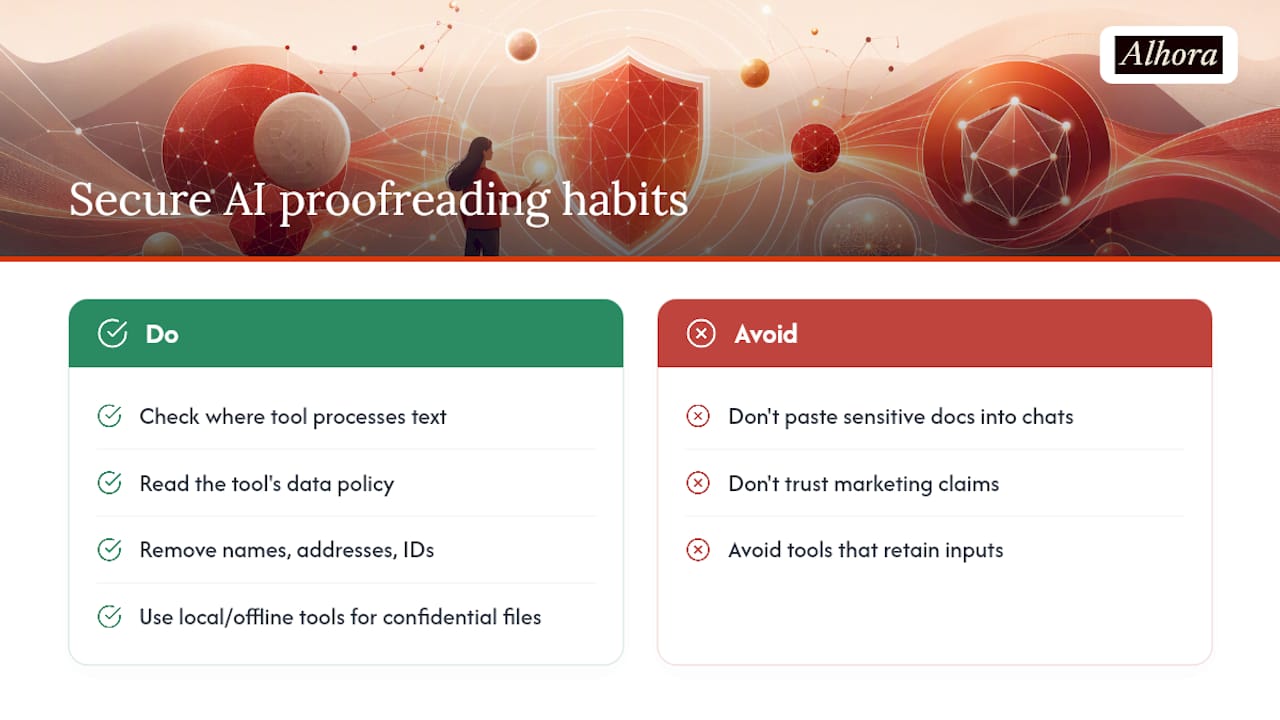
Not every document belongs in a public AI chat window. Unpublished manuscripts, confidential peer reviews, medical or legal writing, and anything under a nondisclosure agreement carry risk the moment you paste them into a third-party tool you don't fully understand.
Before running any sensitive document through an AI proofreader, check where that tool actually processes your text. Some browser-based assistants and chat tools retain input data for model training unless you explicitly opt out; others process text transiently and discard it. Read the tool's data policy, not just its marketing page, before assuming your manuscript is safe.
A few practical habits reduce exposure regardless of which tool you use. Strip identifying details, names, addresses, case numbers, from a document before running a diagnostic pass, if the content allows it. Favor tools that offer local or offline processing for genuinely confidential material rather than chat interfaces that route everything through a remote server. And if your institution or publisher has a data handling policy, treat it as a floor, not a suggestion, when deciding whether AI proofreading is appropriate at all for a given file.
For most everyday writing, a chapter draft, a blog post, a cover letter, this level of caution is overkill. For legal documents, unpublished research, or anything containing personal data about a third party, it isn't optional.
Author Perspective: What Changes Once You Actually Use It
The moment AI proofreading earned my trust was catching a tense shift that had survived two human read-throughs, a paragraph that slipped from past to present and back without anyone noticing. Three takeaways stuck with me: AI catches what tired eyes miss, it never replaces judgment about what your writing should sound like, and the discipline of reviewing every suggestion is the whole point, not a chore to skip.
— James
How Alhora Fits Into an AI Proofreading Workflow
If you've been running chunked drafts through a chat tool and a separate formatting program, Alhora closes that gap by putting proofreading and export validation in the same workspace. Inkia flags issues the way a diagnostic-only prompt would, spelling, punctuation, tense drift, unclear pronouns, and shows you a diff view before anything changes, so you're never bulk-accepting edits you haven't read.
That matters most once you move from drafting to preparing files for actual publication. Real-time validation against KDP, IngramSpark, and other platform standards catches formatting errors while you're still editing, not after a rejected upload. Self-publishers juggling a series benefit most, since batch checks apply the same standards across every book without re-explaining your preferences each time. If you're formatting for Mac, Alhora's book formatting software for Mac page walks through what the workflow looks like from manuscript to export, and the Alhora landing page is the place to start if you want to see the full toolset, AI-assisted proofreading included, before committing to a plan.
Sources
A few resources worth bookmarking as you build your own workflow:
- Check your work with an AI proofreader — Microsoft Edge learning center
- AI Proofreader — DeepAI
- How to Proofread with AI: A Complete Guide — Athens
- How to Proofread Content With AI Tools 2026 Tested | QWE AI Academy
FAQ
Can ChatGPT do proofreading?
Yes, ChatGPT and similar chat tools can flag spelling, grammar, and structural issues when given a scoped, diagnostic prompt. It works best when you explicitly tell it not to rewrite your text, only to list problems and their locations.
Is AI any good at proofreading?
AI is reliably good at catching tense drift, punctuation errors, duplicated arguments, and unclear pronoun references. It is not reliable for fact-checking, verifying citations, or judging whether an argument actually holds up, which still requires human review.
Is it okay to use AI to proofread?
Generally yes, but academic and professional contexts often require disclosure that you used it. A defensible approach runs diagnostic-only prompts, applies fixes manually, and keeps a short change log, an approach QWE AI Academy recommends specifically to avoid academic misconduct issues.
Is there any AI for proofreading?
Several categories exist: real-time inline assistants, dedicated web proofreaders, LLM chat tools like DeepAI's AI Proofreader, and editor plugins. Alhora includes an AI-assisted proofreading engine, Inkia, that flags issues during formatting without ever rewriting your creative content.
Does Alhora replace human editing?
No. Alhora's AI assistant, Inkia, flags issues and proposes edits, but it never writes or alters your creative content, and every suggestion requires your approval through the diff view before it's applied.