
To pass Ace by DAISY, run EPUBCheck first, then run Ace, fix the machine-detectable errors it reports, and finish with a short manual review. That order matters: EPUBCheck confirms your file is structurally valid, and Ace can't reliably check accessibility on a file that fails basic validation.
A "pass" from Ace means your EPUB satisfies Ace's machine-testable rules, not that it meets full WCAG or EPUB Accessibility 1.0 compliance. Those are different bars.
Here's the fast path:
- Validate structure with EPUBCheck.
- Run the Ace App (GUI) or Ace CLI and generate an HTML or JSON report.
- Fix flagged violations: missing alt text, broken heading order, malformed lists, missing language metadata.
- Re-run Ace until only warnings remain, then do a manual spot check.
A significant portion of common EPUB accessibility failures trace back to just three issues: missing alt text, skipped heading levels, and absent language tags. Fix those three first and most reports clean up fast.
Key Takeaways
Passing Ace by DAISY requires running EPUBCheck first, fixing every machine-detectable violation Ace reports, and completing a manual review before calling the book accessible.
| Point | Details |
|---|---|
| Validate before checking accessibility | Run EPUBCheck first; Ace results are unreliable on structurally invalid EPUBs. |
| A pass isn't full compliance | Ace confirms machine-testable rules only, not WCAG or EPUB Accessibility 1.0 conformance. |
| Fix the big three first | Missing alt text, skipped heading levels, and absent language metadata cause most violations. |
| Automate with JSON output | Export JSON reports to feed issue trackers or CI pipelines for faster triage. |
| Manual review is not optional | Spend 10 to 20 minutes with a screen reader on representative chapters even after a clean report. |
Table of Contents
- Quick Pass Checklist: Exact Checks and Fixes to Run First
- How Do You Install and Run Ace?
- What Does an Ace Report Actually Tell You?
- Where Does Automated Checking Stop?
- Where Does Ace Fit in Your Workflow?
- Common Failures and How to Fix Them
- A Practitioner's Take on Automation and Manual Review
- Authoritative Documentation and Tools Worth Bookmarking
- Sources
Quick Pass Checklist: Exact Checks and Fixes to Run First
Before you touch Ace, confirm the file itself isn't broken. A structurally invalid EPUB produces confusing or incomplete Ace results, so treat validation as step zero every time.
- Run EPUBCheck against the file. Fix any fatal errors or errors before moving on.
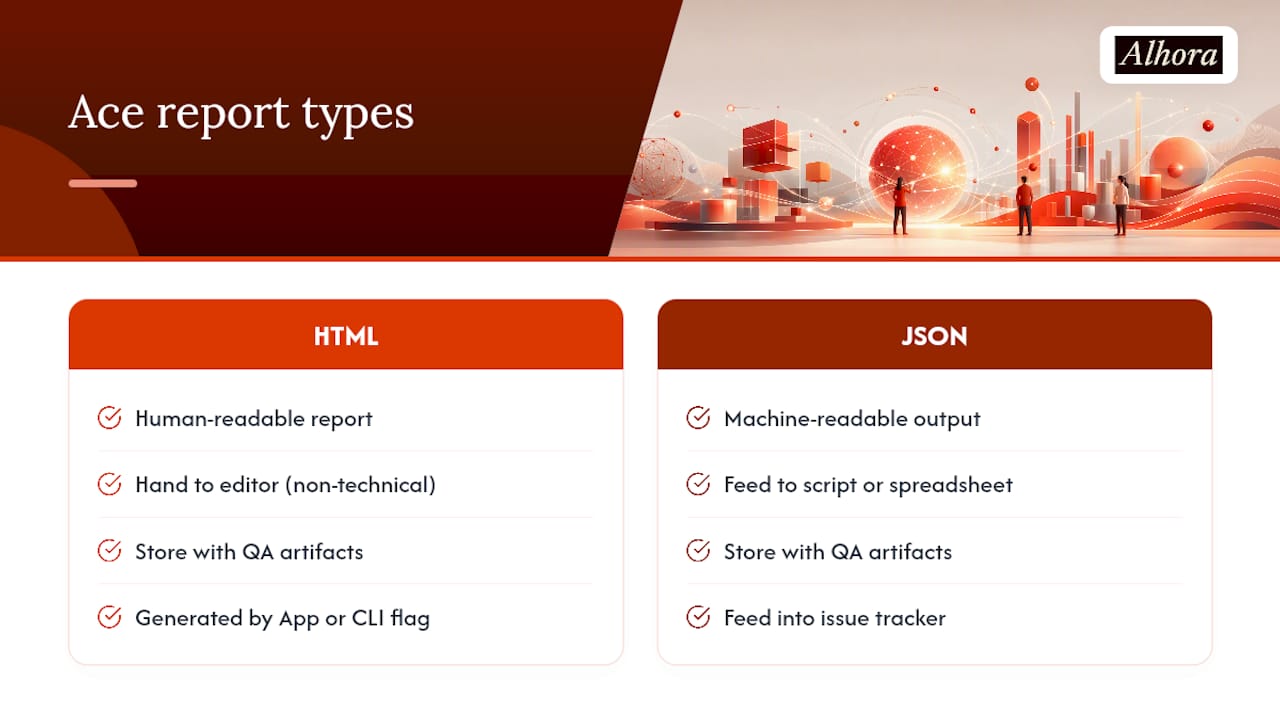
- Run Ace (GUI or CLI) and export both HTML and JSON reports. The HTML version is easier to read for humans; JSON is built for automation.
- Triage violations first, warnings second. Missing alt text, empty headings, malformed lists, and missing
xml:langattributes are the most common blockers. - Fix, then re-run. Don't guess whether a fix worked. Regenerate the report and confirm the violation count drops.
- Repeat until only warnings remain. A completely warning-free report is rare and not required for a pass.
Pro Tip: Keep a running note of which rule IDs you fixed and how. When the same violation shows up in your next book, you'll fix it in two minutes instead of twenty.
How Do You Install and Run Ace?
Ace by DAISY ships as a free, open-source desktop application for Windows, macOS, and Linux, alongside a command-line interface for teams that want to script it. Both pull from the same core rule set, so results match whether you click through the GUI or run it headless in a build pipeline.
The desktop App is the simplest entry point: drag an EPUB in, wait for the scan, and read the HTML report in your browser. The CLI is what you want once you're checking more than one or two files a week. A typical CLI call points Ace at a single EPUB or a directory of EPUBs and specifies an output folder for the report; flags let you choose HTML for human review, JSON for machine parsing, or both at once.

Store the HTML report wherever your team keeps QA artifacts. It's readable enough to hand to an editor with no technical background. The JSON output is what you feed into a script, a spreadsheet, or an issue tracker to auto-generate tickets for each violation.
For version-specific rule changes, check the Ace rule list on GitHub before a release. Rule definitions occasionally shift between versions, and a book that passed clean last month might surface a new warning after an update, not because the book changed, but because Ace did.
What Does an Ace Report Actually Tell You?
An Ace report breaks down into a handful of predictable sections: violations, warnings, passed rules, metadata checks, the document outline, and a full image inventory. Reading it well is less about understanding every rule and more about knowing which sections to act on first.
Violations block accessibility outright and need fixing before anything else. Warnings flag things that are often fine but worth a human glance, like an image whose alt text seems generic. The outline section shows your heading hierarchy as a tree, which makes skipped levels (jumping from an H2 straight to an H4) obvious at a glance.
| Report section | What it tells you | Typical priority |
|---|---|---|
| Violations | Rules that failed outright | Fix immediately |
| Warnings | Possible issues needing judgment | Review, fix if valid |
| Metadata checks | Missing language, title, or accessibility metadata | Fix immediately |
| Outline | Heading structure and nesting | Fix if levels are skipped |
| Image list | Every image plus its alt text status | Fix missing or empty alt text |
Common violations tend to cluster around three causes: an image with no alt attribute, a heading that jumps levels (H2 to H4 with nothing between), or a <ul>/<ol> structure that's really just styled paragraphs. None of these take long to fix once you know where to look, and the JSON export makes it easy to push each one into a ticketing system for a formatter to knock out one by one.
Where Does Automated Checking Stop?
Ace is excellent at catching what a machine can measure: missing attributes, broken markup, absent metadata. It cannot judge whether a long description actually describes the image well, whether your reading order makes narrative sense, or whether a link labeled "click here" tells a screen reader user anything useful. Automated tools flag structural and programmatic problems, but judgment calls need a person.
Run a short manual pass after every clean Ace report:
- Navigate the book using only a keyboard. Confirm nothing traps focus or skips interactive elements.
- Spend 10 to 20 minutes with a screen reader on two or three representative chapters, including any with images, tables, or footnotes.
- Read every long description yourself and ask whether it would actually let a blind reader understand the image.
- Check complex tables for logical row and column relationships that markup alone can't verify.
Pro Tip: Pick chapters with the most images, tables, or unusual formatting for your manual check. That's where automated tools miss the most, and where five minutes of attention pays off the most.
A clean Ace report is a milestone, not a finish line. Accessibility specialists note that automated passes catch a wide category of errors but say nothing about whether the reading experience actually makes sense to someone using assistive technology.
Where Does Ace Fit in Your Workflow?
The earlier you run Ace, the cheaper the fixes. Catching a missing alt attribute during drafting costs a formatter thirty seconds; catching the same problem after a book has already shipped to five retail platforms costs hours of re-exporting and re-uploading. Shifting checks left into the authoring and preflight stages instead of saving them for final QA is the single biggest time-saver available.
- Run Ace during initial EPUB export, not just before submission.
- Run EPUBCheck and Ace back to back, always in that order: structural validity first, accessibility second.
- In a CI pipeline, fail the build on violations and let warnings pass with a logged note for review.
- Before a vendor handoff, run both tools one final time. Rule updates between versions can surface new warnings on files that previously passed clean.
Watch release notes when Ace ships an update. A rule change can turn a previously passing book into one with new warnings overnight, and that's a version issue, not a regression in your file.
Common Failures and How to Fix Them
Most Ace violations trace back to a small set of recurring mistakes in the EPUB's HTML. Fixing them is mechanical once you know the pattern.
- Missing or lazy alt text: write a short, specific description of what the image conveys; mark purely decorative images with
alt=""rather than skipping the attribute entirely. - Broken heading order: never skip a level. If your chapter titles are H1, section heads should be H2, not H3 or H4.
- Malformed lists: wrap actual list content in
<ul>or<ol>tags rather than faking bullets with dashes or line breaks in a paragraph. - Missing language metadata: set
xml:langon the HTML element and confirm the Dublin Core language field matches in your OPF. - Long descriptions placed incorrectly: link complex images to a full description using
aria-describedbyor a dedicated details page, not a caption that only sighted readers will notice. - Table markup gaps: use proper
<th>header cells and scope attributes so a screen reader can announce row and column context.
Pro Tip: Build a short snippet library of correct markup for alt text, headings, and tables. Formatters fix these faster when they can copy a known-good pattern instead of writing it from scratch each time.
A Practitioner's Take on Automation and Manual Review
Run Ace early and often, not just before submission. A five-minute scan during drafting catches most violations before they compound across chapters. Budget fifteen to twenty minutes for manual review on any book with heavy images or tables, even after a clean report.
Don't treat an Ace pass as final acceptance. It's a gate, not a certificate. Watch for rule changes between Ace releases; a book that passed last quarter can surface new warnings purely from a version bump, and that's worth knowing before you panic over a report that suddenly looks different.
— James
Authoritative Documentation and Tools Worth Bookmarking
For anyone maintaining a repeatable accessibility workflow, these are the resources worth keeping close:
- DAISY Knowledge Base on Ace: explains Ace's rule scope and how it relates to EPUBCheck and WCAG.
- Ace by DAISY project page: downloads, CLI documentation, and the canonical rule list.
- Inclusive Publishing accessibility checker hub: getting-started guides and integration notes.
- EPUB Accessibility 1.0 specification: the normative standard behind many of Ace's machine-testable rules.
If you'd rather avoid chasing rule updates and manual remediation checklists book after book, Alhora exports audit-gated accessible EPUBs with built-in validation checks, so your files head into Ace already built around the rules that matter.
Sources
- Ace by DAISY - Accessible Publishing Knowledge Base
- Ace by DAISY – accessibility checking software for EPUB publications - LinuxLinks
- Accessibility checker / Inclusive Publishing