
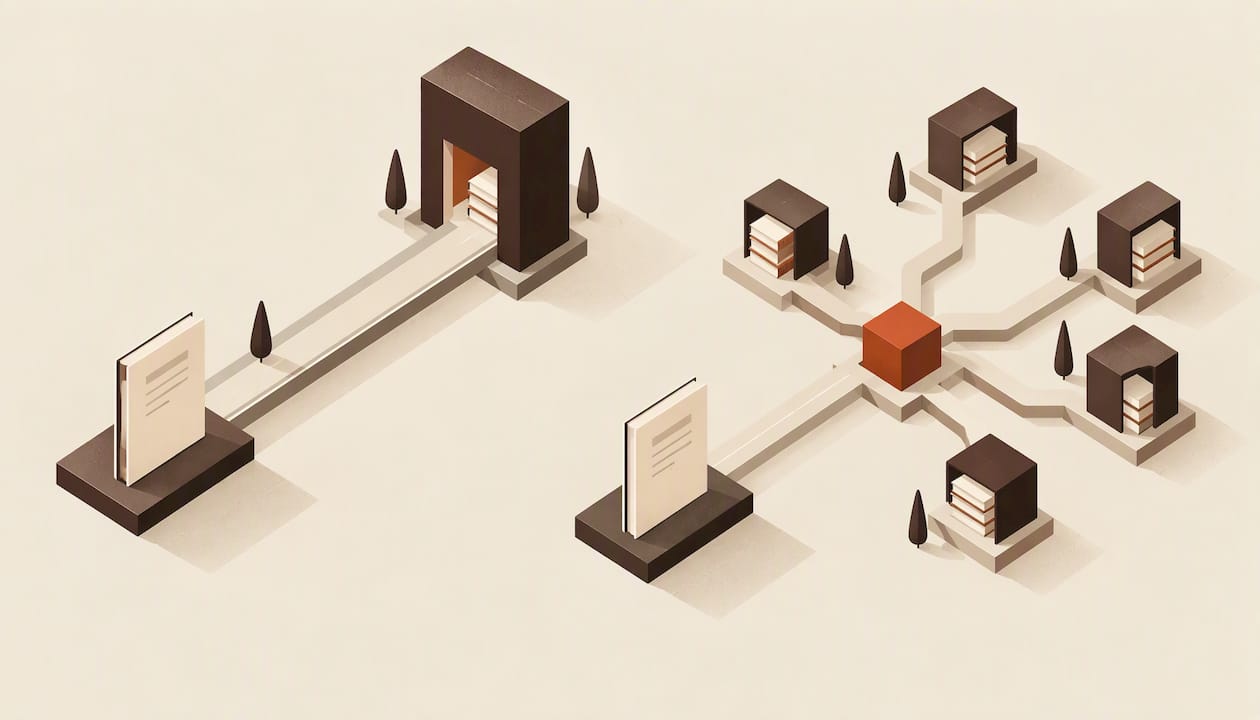
KDP is Amazon's own publishing platform. Draft2Digital (D2D) is an aggregator that sends your ebook, and in some cases your paperback, to many retailers and libraries from one account. For most US indie authors the practical answer is not either/or: publish to Amazon directly through KDP, and use D2D for the other stores, as long as you stay out of KDP Select. If you want Kindle Unlimited, KDP alone is the route. If you want to go wide with minimal admin, D2D does the heavy lifting.
Below you will find what each platform costs, where it sells, what exclusivity means, and how to prepare one set of files that passes both.
Key takeaways
- KDP reaches Amazon only. D2D reaches Apple Books, Kobo, Barnes & Noble, libraries and more, and takes a cut for doing so.
- KDP Select (and with it Kindle Unlimited) requires ebook exclusivity. You cannot be in Select and wide with the same ebook.
- Amazon does not allow double-listing through two routes. Publish to Amazon via KDP, and switch Amazon off in D2D.
- Both platforms reject badly built files. A clean EPUB and a print-ready PDF save you rounds of re-uploads.
- Your choice is reversible. Many authors start in Select, then go wide once a series has momentum.
Table of Contents
- Draft2Digital vs KDP at a glance
- How the two platforms differ in design
- What each one costs you
- Where your books sell
- Exclusivity: the deciding rule
- Can you use both at the same time?
- Which one fits your situation
- Files: what each platform expects from you
- Perspective: formatting is the step both platforms leave to you
- Format once, upload anywhere
- A simple decision path
- FAQ
- Sources
Draft2Digital vs KDP at a glance
| Amazon KDP | Draft2Digital | |
|---|---|---|
| What it is | Amazon's own self-publishing platform | Aggregator that distributes to many retailers and libraries |
| Where your book sells | Amazon | Apple Books, Kobo, Barnes & Noble, library platforms, Bookshop and other storefronts |
| Upfront cost | None | None |
| Who pays whom | Amazon keeps its share of each sale | D2D takes a percentage of the retail price on top of the retailer's share |
| Exclusivity | Only if you opt into KDP Select | None |
| Special programs | KDP Select, Kindle Unlimited, Countdown Deals | Universal book links, bulk and series tools, library reach |
| Best for | Amazon-first launches | Everything outside Amazon, with one dashboard |
The rest of this article fills in each row.
How the two platforms differ in design
KDP is a retailer's back office. You upload to Amazon, and Amazon sells to Amazon customers. Its tools, promotions and ranking systems are built around that one store.
D2D sits between you and the stores. You upload once, pick your retailers, and D2D delivers and updates the book on each. Because it is a middleman, it earns its money by taking a share of sales. The Authors Guild's legal guide for self-publishers tells authors to compare which outlets a service will actually list the book on, and notes that aggregators take a percentage of royalties in exchange for listing on stores such as Apple Books.
That trade is the heart of the decision. One account and one file is convenient. Direct accounts are free and give you retailer-specific metadata control, while distributors can delay metadata changes and updates, as AuthorImprints' distribution guide points out.

What each one costs you
Neither platform charges to publish. You pay through your share of each sale.
Draft2Digital
D2D takes 10% of the retail price of each ebook sold. That is 10% of the list price, not 10% of your royalty. On a $5.00 ebook sold at a store that keeps 30%, the store takes $1.50 and D2D takes $0.50, leaving you $3.00 instead of the $3.50 you would earn selling direct. For print, the same review puts your take at roughly 45% of list price minus printing costs. Rates and terms change, so confirm the current figures on D2D's own pricing page before you commit.
KDP
KDP has no distribution fee, but royalty tiers matter. The commonly cited structure is a 70% ebook royalty for books priced between $2.99 and $9.99 in most territories, with a per-megabyte delivery fee deducted, and 35% outside that band, as laid out in this royalty breakdown. Heavy files with many images cost more in delivery fees, so a lean EPUB earns more per sale. Check Amazon's own royalty help pages before setting prices.
A worked comparison
Take a $4.99 ebook. Through KDP at the 70% tier with a small file, you earn roughly $3.30 to $3.40 per sale after the delivery fee. Through D2D at a store paying 70% of list, you would earn about $3.00 per sale after D2D's 10%. The gap per unit is real, but it only matters if the same reader would have bought on Amazon anyway. D2D's value is the readers on Kobo, Apple and library apps that you would not otherwise reach.

Where your books sell
Ebooks
KDP: Amazon and Kindle apps, worldwide Amazon storefronts.
D2D: Apple Books, Kobo, Barnes & Noble and other retailers, plus library and subscription channels. In 2026 the Authors Guild reported on D2D's Bookshop partnership, which lets self-published authors sell ebooks through Bookshop, with affiliated independent bookstores receiving 30% of list price on each sale. The same piece frames channel diversification as a way to reduce dependence on Amazon's search rankings and recommendation engine.
KDP Print is print-on-demand: Amazon prints when someone orders, and you pay no stock cost. D2D also offers paperback distribution, but many authors who want bookstore and library print reach also look at IngramSpark. If you are weighing print costs, our guide to KDP print costs walks through the numbers, written with UK authors in mind but with the same cost logic.
Exclusivity: the deciding rule
KDP Select is a 90-day, auto-renewing enrollment. It places your ebook in Kindle Unlimited and unlocks promotional tools, but the ebook must stay exclusive to Amazon while enrolled. The SFWA's indie publishing guide describes the same choice: Select gives access to Amazon-specific features but keeps the ebook off other vendors, while a wide title can still sell on Amazon without Select.
Two practical consequences:
- If you enroll in Select, do not use D2D for that ebook. Not for any store, including free sample or library channels.
- If you go wide, you still sell on Amazon. You just forgo Kindle Unlimited page reads and Select promotions.
Print is separate. Select covers the digital edition, so a paperback can sit on other channels.
Can you use both at the same time?
Yes, with a clear division of labor.
- Publish to Amazon directly in KDP. Do not enroll in Select.
- In D2D, choose every store except Amazon.
- Keep metadata (title, subtitle, series name, description, categories, ISBN) identical across both accounts so your book looks like one book everywhere.
Amazon does not accept the same title arriving by two routes. Publishing Perspectives noted in 2017 that authors already distributing through KDP need to delist before distributing the same book through D2D. The cleaner approach is to leave Amazon unchecked in D2D from day one. The SFWA's guide also recommends direct KDP distribution for Amazon because it is streamlined and Amazon is likely to be a major sales source.
Which one fits your situation
| Your situation | Lean toward |
|---|---|
| You write fast-release series for Kindle Unlimited readers | KDP with Select |
| You want your book in libraries and on Apple, Kobo and Nook | D2D (or direct accounts) plus KDP for Amazon |
| You hate managing multiple dashboards | D2D for non-Amazon stores |
| You want the highest per-unit margin and will do the admin | KDP plus direct accounts at each store |
| You are launching your first book and want to learn | KDP first, add wide later |
| You sell mostly in the US and Amazon dominates your category | KDP, with wide as a later experiment |
The Novel Kit's comparison makes a point worth keeping in mind: a single dashboard is convenient, but routing through D2D can cost you money and control on the store that is probably your biggest. That is the argument for keeping Amazon direct.
Files: what each platform expects from you
The platform you choose changes where you upload, but the quality bar is the same everywhere.
Ebook. Both accept EPUB. D2D also converts Word documents, but its automatic conversion gives you limited design control. A hand-built or software-built EPUB gives you consistent chapter breaks, a working table of contents and clean fonts across devices. If you want to see how stores check your file, read our piece on EPUB 3 vs EPUB 2, and our step-by-step ebook formatting guide.
Paperback. KDP needs a print-ready PDF at the correct trim size, with the right margins, gutter and bleed. Errors show up in the previewer or later in Look Inside. Our guide to formatting a book for KDP covers the setup, and eight Look Inside checks will save you a re-upload.
D2D. Its own conversion has quirks, so run through a 15 minute D2D formatting checklist before uploading.
The efficient workflow is to build one master manuscript, export an EPUB for the wide stores and Amazon, and export a separate print PDF. Reformatting for each platform is where authors lose weekends.
Perspective: formatting is the step both platforms leave to you
We build Alhora, so we see the same problem from both sides of this comparison. Authors spend days on distributor choice, then upload a file with a broken table of contents, uneven justification or margins that fail the print preview. Neither KDP nor D2D fixes that for you. They check that a file is acceptable, not that it looks professional.
Our view is simple. Pick distribution on strategy: Select if Kindle Unlimited is your engine, wide if you want reader choice and library reach, or both in sequence. Then treat formatting as separate from distribution. One well-typeset source should feed every channel, so changing your mind about KDP Select later costs you a re-export, not a rebuild.
That is why Alhora validates against publishing standards as you work, and why our AI assistant, Inkia, only flags issues and never writes or changes your words. We do not replace KDP or D2D. We prepare the files they receive.
— James
Format once, upload anywhere
Alhora is a book formatting studio for Mac, Windows, Linux and ChromeOS. It turns a manuscript into a typeset EPUB and print-ready PDF, with trim, bleed and gutter checks, automatic typography (justification, hyphenation, widow and orphan control, drop caps), batch series formatting, and export targets for KDP, IngramSpark, Draft2Digital, Apple Books, Kobo and Google Play. The lifetime license is a one-off £99.
If you are building a series, batch formatting means every book in it shares the same look. See how it works for KDP book formatting or explore ebook formatting software for every store.
A simple decision path
- Decide on Kindle Unlimited. If your genre and release pace suit it, enroll in KDP Select and stay Amazon-only for 90-day terms.
- If not, go wide. Publish on Amazon through KDP without Select, and put everything else through D2D or direct accounts.
- Format once. Export your EPUB and print PDF from one master file.
- Match metadata. Same title, series data, description and ISBN approach everywhere.
- Review after a few months. Compare sales by channel and adjust. Select terms renew every 90 days, so you can leave without penalty at the end of a term.
FAQ
Is Draft2Digital better than KDP?
Neither is better outright. KDP is better for Amazon sales and Kindle Unlimited, and D2D is better for reaching other retailers and libraries from one account. Most authors who go wide use both, with KDP for Amazon and D2D for everything else.
How much does Draft2Digital take?
D2D has no upfront fee. Reviewers report it takes 10% of the retail price on ebook sales, on top of the retailer's own share. Check D2D's pricing page for current terms.
Can I publish the same book on KDP and Draft2Digital?
Yes, if D2D does not send it to Amazon and the ebook is not in KDP Select. Publish to Amazon through KDP and tick every other store in D2D. Double-listing on Amazon through both routes is not allowed.
Is Amazon KDP print-on-demand?
Yes. KDP prints paperbacks when readers order them, so you carry no inventory. You set the price, and your royalty is what remains after Amazon's printing cost and its share.
Do I need to reformat my book for each platform?
Not if you start from a clean master file. Export an EPUB for ebook stores and a separate print PDF sized for your chosen trim. Only the cover and metadata differ per channel.
Sources
- Self-Publishing Options: Ebooks and Print on Demand, Authors Guild Writers Legal Guide
- Why Indie Authors Should Consider Expanding to Bookshop, Authors Guild
- Indie Pub 101: Sales Channels, SFWA
- Platform Notes: Draft2Digital Adds Distribution to Amazon, Publishing Perspectives
- 2021 Decision Guide for Evaluating eBook Distribution Services, AuthorImprints
- Draft2Digital and Amazon KDP Compared, The Novel Kit
- Draft2Digital Review, Kindlepreneur
- KDP Royalty Rates guide, KDP Easy
- KDP Select and Kindle Unlimited, Vappingo