
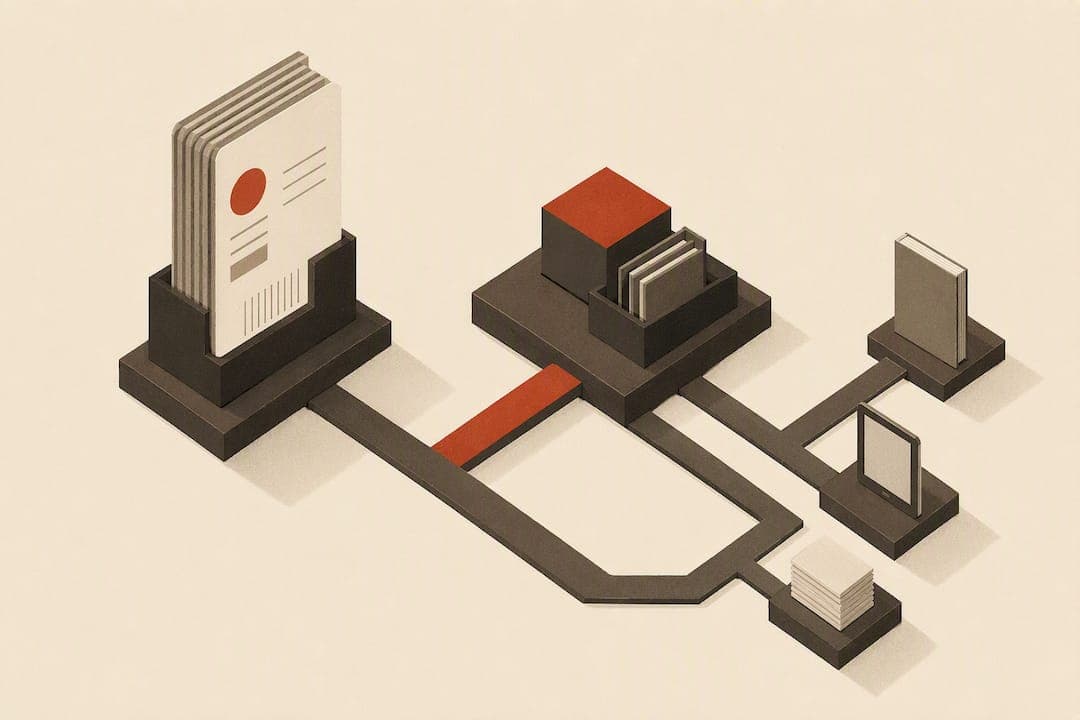
An ISBN is a 13-digit code that identifies a specific book edition anywhere in the world; an ASIN is a 10-character code Amazon assigns to any product, book or not, sold on its site. If you're publishing a Kindle eBook, Amazon gives you an ASIN automatically and you don't need an ISBN. If you're publishing paperback or hardcover, you need an ISBN. Whether you buy your own or take Amazon's free one is the real decision.
TL;DR:
- Authors publishing only Kindle eBooks do not need an ISBN, as Amazon assigns an ASIN automatically, but print editions require a valid ISBN if distributed outside Amazon.
- Using a free KDP ISBN locks the imprint as "Independently published," while buying your own from Bowker allows imprint customization and portability across distributors.
- Mismatched metadata such as imprint, author name, or title between Bowker and KDP causes validation issues, making consistency critical before publishing.
- ASINs are Amazon-specific identifiers that track only listings on Amazon, while ISBNs serve as permanent industry-wide records essential for wider distribution or library inclusion.
- Linking multiple formats with accurate metadata and consistent formatting ensures unified listings and preserves reviews and sales history across Kindle, paperback, and hardcover editions.
Table of Contents
- ISBN vs ASIN: What an ISBN Actually Is
- ISBN vs ASIN: What an ASIN Is and Where It Stops Working
- Which Formats Actually Require an ISBN?
- How to Get an ISBN: Free From KDP or Bought From Bowker
- Where to Find Your ISBN and ASIN (and Fix Mismatches)
- Decision Checklist: Which Identifier Path Fits Your Goals
- How ASINs Work for Non-Book Products, and Why That Matters for Authors
- Does ASIN or ISBN Affect How Readers Find Your Book?
- Linking Your ISBN and ASIN Across Multiple Formats
- Where ISBN-Only or ASIN-Only Thinking Breaks Down
- What Most Authors Get Wrong About Their First ISBN Choice
- Format and Validate Your Metadata Before You Upload
- Where to Verify the Rules Yourself
- Sources
- FAQ
ISBN vs ASIN: What an ISBN Actually Is
An ISBN is an ISO-standard identifier, governed by ISO 2108 and issued through national agencies. It's been a 13-digit code since 2007, and every distinct edition or format of your book needs its own number. A paperback, a hardcover, and an ePub sold outside Amazon are three separate products in the eyes of the International ISBN Agency, so each one gets its own ISBN.
That specificity is exactly why bookstores, libraries, and distributors rely on it. An ISBN tells a Barnes & Noble buyer, a library cataloger, or an IngramSpark distribution partner precisely which version of your book they're ordering.
Who touches an ISBN and why:
- Bookstores use it to order and shelve the correct edition.
- Libraries use it for cataloging and interlibrary loan systems.
- Distributors like IngramSpark and Draft2Digital use it to route your title to retail partners.
- Retailers outside Amazon require it before they'll list your book at all.
ISBN vs ASIN: What an ASIN Is and Where It Stops Working
An ASIN is Amazon's own catalog number, assigned the moment a product goes live on the platform. It works for Kindle eBooks, print books, and every other physical product Amazon sells, from paperbacks to garden hoses. You never buy an ASIN, apply for one, or register it anywhere. Amazon generates it, and that's the end of the process.
The tradeoff is scope. An ASIN carries zero weight anywhere outside Amazon's own systems. Key facts to keep straight:
- ASINs are 10 characters, usually starting with "B" for most products.
- They're assigned automatically at listing time, with no application or fee.
- A print book on Amazon typically has both an ISBN and an ASIN linked on the same product page.
- A Kindle eBook has only an ASIN, since Amazon doesn't require an ISBN for its own eBook format.
That last point trips up a lot of new authors: seeing an ASIN on your paperback listing doesn't mean the ISBN disappeared. Amazon just displays the ASIN as its internal reference while the ISBN keeps working everywhere else.
Which Formats Actually Require an ISBN?
The rule breaks down cleanly by format, and knowing it upfront saves you from buying identifiers you don't need or skipping ones you do.
- Kindle eBook sold only on Amazon. No ISBN required. Amazon assigns an ASIN and that's your only identifier.
- Paperback or hardcover through KDP. ISBN required. You can accept a free one from KDP or supply your own.
- Audiobooks. Platforms like Audible and ACX use their own internal identifiers, not traditional ISBNs, though some distributors still request one for metadata consistency.
- Low-content books (journals, planners, coloring books). Technically the same paperback rule applies, but many low-content publishers skip wide distribution entirely and rely solely on the free KDP ISBN since they never plan to sell outside Amazon.
- Cross-platform ebook distribution (Apple Books, Kobo, Google Play). These retailers generally require an ISBN for eBooks, even though Amazon's Kindle store doesn't.
That fifth case is where a lot of authors get caught off guard. Your Kindle edition never needs an ISBN, but the moment you push that same manuscript to Kobo or Apple Books through a service like Draft2Digital, you'll need one.
How to Get an ISBN: Free From KDP or Bought From Bowker
KDP's free ISBN is genuinely free, and it's a real, registered ISBN, not a placeholder. It gets recorded with Bowker, the US ISBN agency, but two conditions come attached: your imprint shows up as "Independently published" on the listing, and the ISBN is locked to KDP. You can't take a KDP-issued ISBN and use it to publish the same edition through IngramSpark or a different platform.
Buying your own ISBN through Bowker's MyIdentifiers removes both restrictions. You choose your own imprint name, and the ISBN travels with you to any distributor. Cost is where the math gets interesting: a single ISBN costs meaningfully more per unit than buying a pack of 10 or 100, so if you're planning a series or multiple formats, a pack pays for itself fast.
Weigh these factors before choosing:
- Do you want your own imprint name instead of "Independently published"?
- Are you planning to distribute through IngramSpark, bookstores, or libraries?
- How many titles or formats will you eventually publish?
- Do you need bookstore returnability, which typically requires an imprint you control?
Pro Tip: Buy your ISBN pack before you format your final files. Adding a purchased ISBN after your book is already live on KDP means updating your copyright page and re-uploading, which can trigger a fresh round of validation checks.
Where to Find Your ISBN and ASIN (and Fix Mismatches)
Your ASIN sits in the product details section of any Amazon listing, usually labeled "ASIN" alongside dimensions and publication date. Inside your KDP dashboard, it appears on your title's marketplace page once the book goes live. Your ISBN, for print editions, shows up in that same product details block, and separately on your book's copyright page and in your KDP title setup screen.
Here's where things get messy: metadata mismatches between your KDP record and your Bowker registration cause a disproportionate share of listing headaches. According to Amazon KDP's own guidance, exact-match imprint spelling and title/author consistency across both records is the most common cause of validation failures when authors bring a purchased ISBN into KDP.
Quick fixes for the usual culprits:
- Capitalization differences between your Bowker registration and your KDP title field, even a single lowercase letter, can flag a mismatch.
- Imprint spelling must match character for character between the two systems.
- Author name formatting (middle initials, suffixes) needs to be identical in both places.
- Revalidate after any correction by resubmitting your title metadata in KDP rather than assuming the fix applied automatically.
Decision Checklist: Which Identifier Path Fits Your Goals
Match your publishing goal to the right choice before you touch the KDP upload screen.
- Publishing Kindle only, no print edition. Use the automatic ASIN. No action needed.
- Publishing print through KDP only, Amazon exclusive. Take the free KDP ISBN.
- Planning wide distribution, bookstores, or your own imprint. Buy an ISBN from Bowker, and consider a pack if you have more titles coming.
Recommended next step for the third path: set your imprint name in KDP's title details, then buy your ISBN pack through MyIdentifiers before you finalize your interior files. Switching from a free KDP ISBN to a purchased one after publication means a new ISBN, a new copyright page, and effectively a new edition record. It's not a quick swap, so decide early if you can.
Pro Tip: If you're on the fence, buy a pack of 10 even if you only have one book right now. The per-unit savings on packs make waiting more expensive than committing early.
How ASINs Work for Non-Book Products, and Why That Matters for Authors
Amazon assigns ASINs to everything it sells, not just books. A phone case, a kitchen gadget, and your paperback all get the same 10-character treatment because ASINs exist to solve one problem: giving Amazon's internal systems a consistent way to track inventory, pricing, and reviews across a catalog with hundreds of millions of listings.
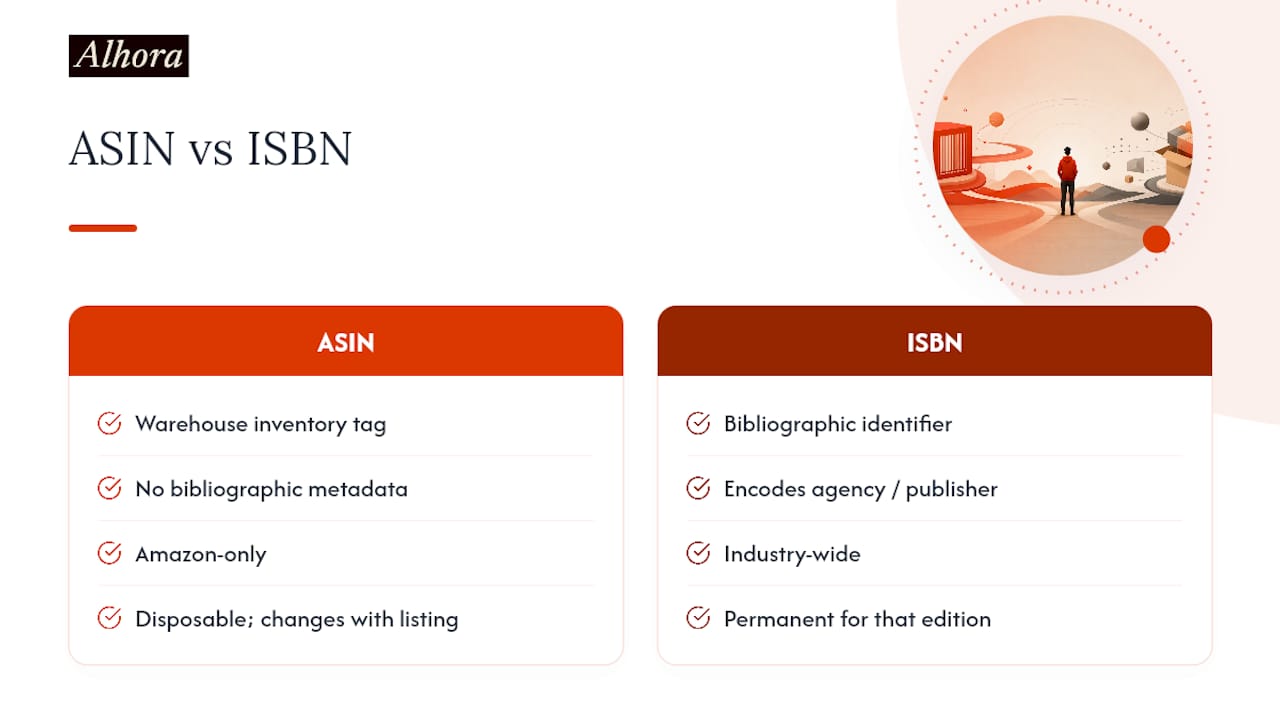
That universality is useful for Amazon and mostly irrelevant for you as an author, with one exception worth understanding. Because ASINs aren't book-specific, they carry none of the metadata conventions publishers rely on. An ISBN encodes information about the registering agency and, indirectly, the publisher. An ASIN encodes nothing about content type at all. It's a warehouse tag, not a bibliographic record.
The practical implication shows up when you're troubleshooting reviews or rankings. If your book and a completely unrelated product accidentally share confused metadata (rare, but it happens with variation groupings or incorrect category assignments), the ASIN system won't self-correct the way an ISBN-based catalog would, because ASINs don't inherently know or care that your product is a book.
It also explains why your book's ASIN changes if you ever create a new listing from scratch, say, after a major relaunch with a new cover and title, while a purchased ISBN would stay associated with that edition's registration permanently. ASINs are disposable and Amazon-specific. ISBNs are meant to be permanent industry-wide records. Authors planning long careers with backlist titles benefit from understanding that the ISBN is the identifier with institutional memory, while the ASIN just tracks whatever's currently live on Amazon's servers.
Does ASIN or ISBN Affect How Readers Find Your Book?
Neither identifier directly powers Amazon's search algorithm the way keywords, categories, and sales velocity do. But they shape discoverability indirectly, and in different ways depending on where your reader is looking.
On Amazon, your ASIN is what ties together your reviews, your sales rank, and your "customers also bought" placement. Every bit of social proof your book accumulates attaches to that ASIN. This is why merging or changing ASINs (through a relaunch, for instance) can reset your review count and sales history, which is a real cost to visibility even though the writing inside the book hasn't changed at all.
Off Amazon, your ISBN is the thread that connects your book across the wider industry. A library patron searching a catalog, a bookstore owner checking availability, or a book blogger cross-referencing an edition all rely on the ISBN, not an ASIN Amazon never shares outside its own platform. If you're only visible through an ASIN, you're effectively invisible to every discovery channel that isn't Amazon itself, including most library and academic systems.
For marketing purposes, this means your promotional strategy should match your identifier strategy. If you're Amazon-exclusive, funnel every ad, every mention, every link straight to your ASIN-based Amazon listing. If you're distributing wide, your ISBN needs to appear consistently in press kits, on your author website, and in any metadata feed you send to distributors, because that's the number reviewers, librarians, and bookstore buyers will actually search for.
Linking Your ISBN and ASIN Across Multiple Formats
A single book title with three formats, Kindle, paperback, hardcover, generates three separate identifiers: one ASIN for the Kindle edition, and one ISBN each for the paperback and hardcover (with a fourth ASIN attached automatically once each print edition lists on Amazon). Keeping these connected on the reader-facing side is what makes your book page show "available in Kindle, paperback, and hardcover" as one unified listing instead of three disconnected products.
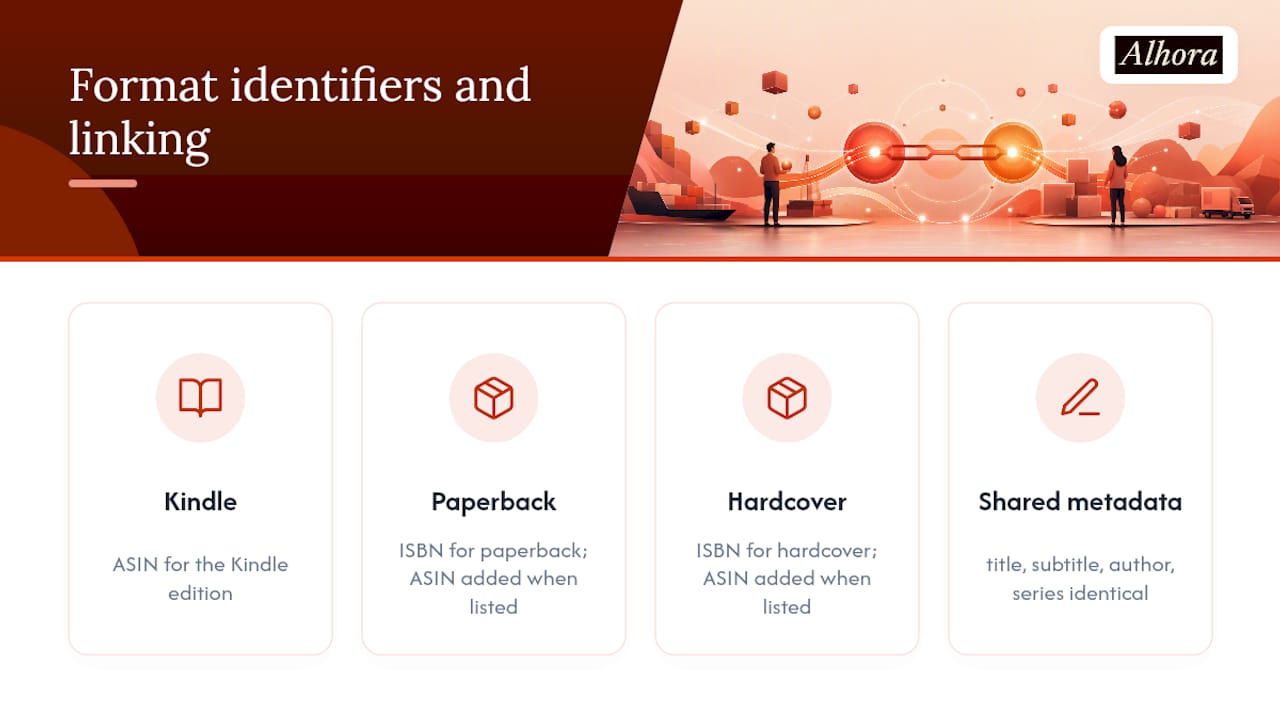
Amazon handles most of this linking automatically when your metadata matches closely enough, title, subtitle, author name, and series information all need to be identical across every format you upload. Small inconsistencies, like listing yourself as "J. Smith" on one format and "Jane Smith" on another, can cause Amazon's system to treat them as unrelated products instead of edition variants of the same book.
Your best defense is consistency at the source. Before you upload a second or third format, pull up your first listing and copy the exact title, subtitle, series name, and author field character for character. Set your imprint name once, decide whether you're using a free or purchased ISBN for that decision, and carry the identical values through every subsequent upload.
If you're distributing beyond Amazon, this linking problem gets harder because there's no single company automatically connecting your records. Your ISBN registration through Bowker, your KDP listing, and any distributor feed through Draft2Digital or IngramSpark all need matching metadata independently. This is where a lot of authors lose hours to mismatched capitalization or a dropped middle initial, chasing down why a paperback and its eBook counterpart show up as separate, unrelated titles on a retailer's site instead of variants of the same book.
Where ISBN-Only or ASIN-Only Thinking Breaks Down
Treating ASIN as your only identifier works fine right up until you want to leave Amazon, and that's the trap. Authors who publish Kindle-only for years sometimes discover, when a book club or library reaches out, that their book literally cannot be found or ordered through standard industry channels. No ISBN means no entry in Books in Print, no easy library acquisition, and no path to a bookstore order without significant extra setup.
The opposite mistake, treating ISBN as sufficient on its own, is less common but still happens. An ISBN gets your book into distribution catalogs, but it does nothing for your visibility inside Amazon's own search and recommendation systems. You still need the ASIN-linked listing, with reviews and sales history attached, to show up in Amazon's algorithm. A perfectly registered ISBN sitting on a book with no Amazon presence at all is nearly as invisible to most readers as no identifier whatsoever, since most self-published sales happen through Amazon.
The deeper limitation with both systems is that neither one tracks your book across formats automatically once you leave the walled garden of a single platform's dashboard. A wide-distribution author juggling KDP, IngramSpark, and Draft2Digital is manually keeping three sets of records synchronized, and a single typo in any one of them can fracture a book into disconnected listings across retailers. Identifiers solve the problem of uniquely naming your book. They don't solve the problem of keeping that naming consistent across every place your book eventually lands.
What Most Authors Get Wrong About Their First ISBN Choice
Most authors start with KDP's free ISBN, and that's usually the right call for a first book aimed at Amazon. The mistake isn't the starting choice. It's not revisiting it once the goals change, series plans solidify, or a library reaches out wanting a bookstore-returnable edition that a KDP-issued ISBN can't provide.
The other pattern worth watching: metadata sloppiness causes far more publishing headaches than identifier choice ever does. A mismatched imprint name or an inconsistent author field between your Bowker registration and your KDP upload will cost you more time than any decision about which ISBN to buy. Clean, consistent front matter and exact metadata matching across every platform prevent the majority of validation failures authors run into.
This is exactly the kind of detail a formatting workflow with built-in metadata checks catches before it becomes a rejected upload.
— James
Format and Validate Your Metadata Before You Upload
A book formatting tool can help catch metadata mismatches before platforms flag them, rather than discovering issues after a rejected upload. Metadata management tools can track ISBN, imprint, and title fields alongside your manuscript, and a proof simulator may let you preview how your book will render before committing to an export.
Export presets built for major distributors can help ensure your file structure, trim size, and front matter align with platform expectations on first submission, reducing the back-and-forth during a launch. If you're choosing between a free KDP ISBN and a purchased one, getting your imprint and metadata locked in correctly from the start saves you from a second round of corrections later. Explore Alhora's book formatting software to see how the export and metadata tools fit into your publishing workflow, and check the KDP-specific formatting guide if Amazon is your first stop.
Where to Verify the Rules Yourself
- Amazon KDP's official ISBN guidance covers free ISBN eligibility and imprint behavior directly from the source.
- The International ISBN Agency explains ISO 2108 and how national agencies assign numbers.
- Bowker's MyIdentifiers FAQ is the place to buy US ISBNs and check current pricing.
- Built&Written's ISBN guide breaks down free versus paid ISBN decisions for indie authors.
Sources
- What is an ISBN? — International ISBN Agency
- Get an ISBN — Amazon KDP Help
- Isbn
- Do Self-Published Authors Need an ISBN in 2026? (Free vs Paid) | Built&Written
FAQ
Is an ISBN Required to Sell a Book on Amazon?
Not always. Kindle eBooks sold through KDP only need the ASIN Amazon assigns automatically. Paperback and hardcover editions do require an ISBN, though KDP will provide one free if you don't supply your own.
Where Can I Find the ASIN on a Book's Listing?
Look in the product details section of the Amazon listing page, usually below the dimensions and publisher information. It also appears in your KDP dashboard once your title is live.
Can I Self-Publish and Get an ISBN at the Same Time?
Yes. KDP offers a free ISBN during the publishing setup process for eligible print formats, or you can purchase your own from Bowker's MyIdentifiers beforehand and enter it during upload.
Is ISBN Mandatory for Every Format on KDP?
No. Kindle eBooks don't require one, but paperback and hardcover formats do. You can accept KDP's free ISBN or use a purchased one for imprint control and portability to other distributors.
Does Alhora Help With ISBN and Metadata Setup?
Alhora includes metadata management tools that track ISBN, imprint, and title fields alongside your manuscript, plus export presets built for KDP and Ingram. Current pricing is listed on the Alhora website.