

Buy your own ISBN from Bowker/MyIdentifiers if you want to sell through multiple retailers, get into libraries, or appear in wholesale catalogs with your name as publisher of record. If you plan to sell exclusively through Amazon KDP and never move that title elsewhere, the free KDP-supplied ISBN is a reasonable shortcut. That's the whole decision in two sentences.
The International ISBN Agency sets the global standard, and in the U.S., Bowker is the only authorized agency. Amazon KDP can assign a free ISBN for print books and an ASIN for Kindle ebooks, but those identifiers come with real limitations covered below.
Table of Contents
- What is an ISBN, an imprint, and a barcode?
- Do you need an ISBN to self-publish?
- Where can you buy an ISBN in the United States?
- How many ISBNs do you need, and when should you assign them?
- How do you assign an ISBN and get your book into retailer databases?
- Buying your own ISBN vs using a free platform ISBN
- What barcode does your print book need, and where does it go?
- How much does an ISBN cost, and how long does it take?
- Your step-by-step checklist to buy, assign, and publish
- How Alhora fits into your ISBN and publication workflow
- Key Takeaways
- Why owning your ISBN is the right default for most authors
- Alhora makes your final files publication-ready
- Useful sources and further reading
What is an ISBN, an imprint, and a barcode?
An ISBN is a 13-digit number that uniquely identifies a specific edition of a book. The number encodes a prefix (978 or 979), a registration group (language/country), a publisher element, a title element, and a check digit. Change the format or revise the edition significantly, and you need a new number. It is not a copyright registration or a proof of quality. It is a product identifier, the same way a UPC code identifies a box of cereal.
Your imprint is the publisher name attached to that ISBN. When you buy an ISBN through Bowker, you choose an imprint during setup. That name appears in Books in Print, retailer databases, and library catalogs as the publisher of record. It can be your own name, a business name, or a small press name you create. The imprint is not the same as your author name.
The barcode on the back cover of a print book is an EAN-13 barcode derived directly from the ISBN, sometimes with a price add-on encoded in a smaller five-digit supplemental barcode. You cannot generate a valid retail barcode without an ISBN first.
A few quick examples of how identifiers work across formats:
- Paperback edition: — needs its own ISBN; barcode goes on the back cover
Do you need an ISBN to self-publish?
It depends on where and how you plan to sell. Here are the three scenarios that cover most indie authors:
- Wide print distribution (bookstores, libraries, wholesale): — You need an ISBN. Retailers and distributors like Ingram require one to list your title in their catalogs.
Amazon KDP lets you choose between a free KDP-supplied ISBN for print books or your own purchased ISBN. The free KDP ISBN is non-transferable: you cannot take it to IngramSpark or another printer. KDP also checks that the imprint you enter matches the one registered to that ISBN, so mismatches cause upload errors.
Three clear outcome paths:
Pro Tip: If you are even slightly unsure about staying platform-exclusive, buy your own ISBN now. Switching later means re-uploading files, updating metadata everywhere, and potentially losing reviews or sales history on some platforms.
Where can you buy an ISBN in the United States?
Bowker, operating through MyIdentifiers.com, is the sole authorized ISBN agency for the United States. The Library of Congress does not issue ISBNs and directs all U.S. publishers to Bowker. There is no cheaper or faster official alternative for U.S.-based authors.
The purchase process is straightforward:
- Create an account — at MyIdentifiers.com with your name or publishing company name.
- Complete checkout — ISBNs are added to your account immediately after purchase.
Bowker's published pricing as of this writing:
| Quantity | Price | Effective cost per ISBN |
|---|---|---|
| 1 ISBN | $125 | $125 |
| 10 ISBNs | $295 | $29.50 |
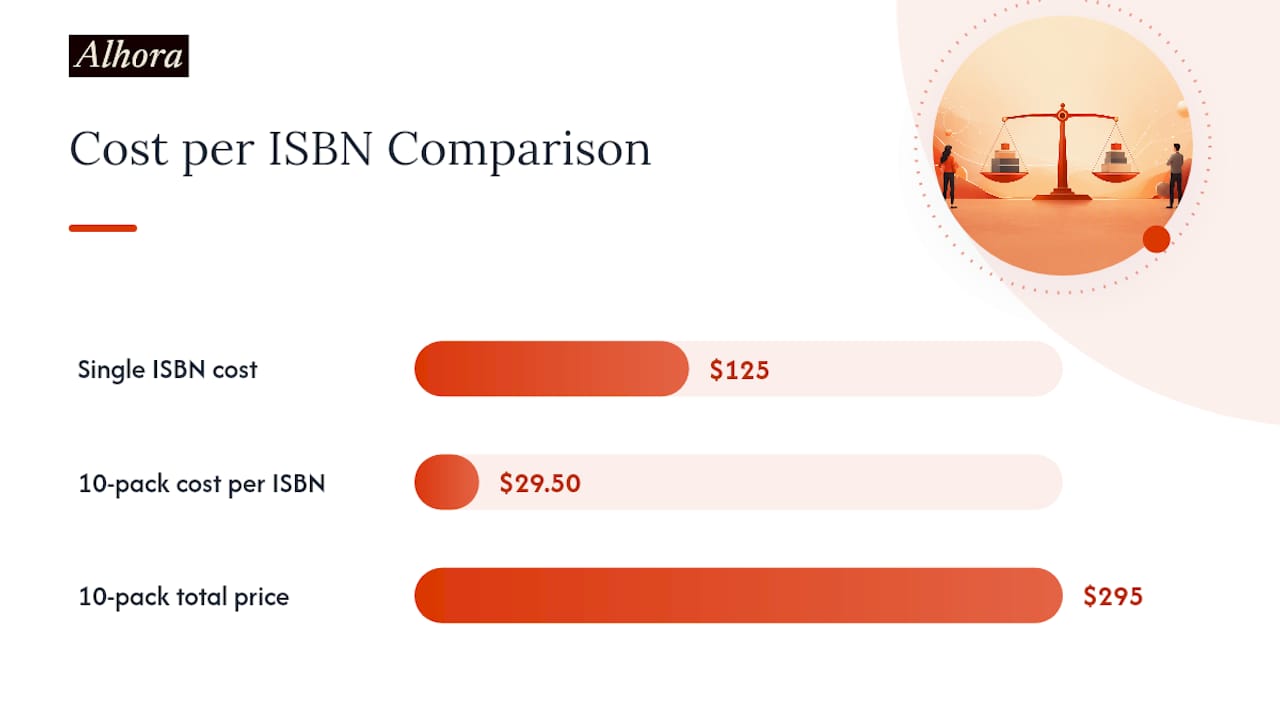
Prices are subject to change; check MyIdentifiers.com for current rates before purchasing. ISBNs never expire, so buying a block in advance is a safe investment if you plan to publish multiple titles or formats.
For help, Bowker offers phone support and a help center through MyIdentifiers.com. The International ISBN Agency handles global standards and cross-border arrangements, but U.S. authors should always start with Bowker.
How many ISBNs do you need, and when should you assign them?
One ISBN per format per edition. That rule covers almost every situation you will encounter.
- Paperback and hardcover — of the same title: two ISBNs
Timing matters too. Assign an ISBN as soon as your metadata is finalized, ideally before you submit files to retailers. You can reserve an ISBN in your Bowker account and fill in the metadata later, but retailers and distributors need accurate metadata at upload time. Submitting with placeholder data and updating later causes propagation delays.
If you are publishing one title in one format and are not sure about future projects, a single ISBN is fine. If you are writing a series or planning print plus ebook plus audiobook, a 10-pack makes the per-ISBN cost much more manageable, as the pricing table above shows.
How do you assign an ISBN and get your book into retailer databases?
Buying the ISBN is step one. Getting your book discovered requires filling in the metadata that flows from your ISBN registration out to retailers and libraries.
Core metadata fields to complete in your Bowker/MyIdentifiers account and in every retailer or aggregator upload:
- ISBN (13-digit, with hyphens in the correct grouping)
- Title and subtitle (exactly as they appear on the cover)
- Author name(s) and contributor roles
- Edition statement (if applicable)
- Imprint/publisher name (must match exactly what you registered with Bowker)
- Publication date
- Format (paperback, hardcover, ebook, audiobook)
- Page count and trim size (for print)
- Language
- BISAC subject category (the industry-standard subject classification)
- Retail price
- ASIN (if the book is also on Amazon, add it as a cross-reference)
The imprint field is the one that trips up the most authors. Whatever name you registered with Bowker must appear character-for-character in your KDP, IngramSpark, or aggregator upload. A mismatch between "Sunrise Press" and "Sunrise press" can cause a file rejection.
Once you submit metadata to Bowker, it flows to Books in Print and eventually to library acquisition databases. Retailer metadata goes through each platform's own upload system. Aggregators like Draft2Digital or IngramSpark push your metadata to their distribution partners.
Pro Tip: Keep a plain-text document with your exact imprint string, ISBN, and publication date for each title. Copy-paste it every time you fill in a new retailer form. One stray character can cause a mismatch that takes days to resolve.
Buying your own ISBN vs using a free platform ISBN
This is the trade-off most indie authors wrestle with, and the right answer genuinely depends on your distribution goals.
| Factor | Your own ISBN | Free platform ISBN |
|---|---|---|
| Publisher of record | You | The platform |
| Portability | Any retailer, printer, distributor | That platform only |
| Library/wholesale access | Yes | Limited or none |
| Upfront cost | $125 (single) or less per ISBN in bulk | $0 |
| Metadata control | Full | Platform-controlled |
| Professional credibility | Higher | Lower |
The core advantages of owning your ISBN:
- You appear as the publisher in every database, not Amazon or another platform
- You can move the title to a different printer or distributor without starting over
- Libraries and wholesalers like Ingram require ISBNs registered to a publisher, not a retail platform
- Your imprint builds a recognizable publishing identity over time
The case for a free platform ISBN is simpler: if you are publishing one book, selling only on that platform, and have no plans to expand, the free option saves $125 and gets you live faster. Indie-focused guides consistently recommend buying your own when you plan to go wide, and accepting the free ISBN only for genuinely platform-exclusive projects.
The ISBN vs ASIN distinction matters here too. An ASIN is Amazon's internal identifier, assigned automatically to every product on the platform. It works fine within Amazon's ecosystem but means nothing to a library acquisition system or a bookstore ordering through Ingram. If your distribution goal extends beyond Amazon, an ISBN is the only identifier that travels with you.
One-sentence decision rule: if your book will ever appear outside the platform where you first publish it, buy your own ISBN before you publish anywhere.
What barcode does your print book need, and where does it go?
The barcode on a print book's back cover is an EAN-13 barcode, which is simply the ISBN converted into a scannable format. Printers and retailers need it to process the book at point of sale and in warehouse systems.
What you need to know before submitting print files:
- The barcode is derived from your 13-digit ISBN; you cannot use a generic barcode generator that does not support EAN-13
- Most printers require a high-resolution image (300 dpi minimum) in PNG or EPS format embedded in the back cover
- The barcode goes in the lower-right corner of the back cover, within the safe area and clear of the bleed zone
- A price add-on (five-digit supplemental barcode) is optional but common for retail books; leave it blank if you plan to sell at multiple price points
- Barcode generation is separate from ISBN purchase; Bowker offers barcode generation as an add-on service, and several standalone EAN-13 barcode tools are available
Pro Tip: Ask your printer whether they want the barcode embedded in the cover PDF or supplied as a separate image file. Some print-on-demand services generate the barcode automatically if you provide the ISBN; others require you to place it yourself. Confirm before you finalize the cover file.
How much does an ISBN cost, and how long does it take?
Bowker's current pricing (subject to change at MyIdentifiers.com):
| Package | Cost | Per-ISBN cost |
|---|---|---|
| 1 ISBN | $125 | $125 |
| 10 ISBNs | $295 | $29.50 |
The ISBN itself appears in your Bowker account immediately after purchase. What takes longer is metadata propagation:
- 0–24 hours: — ISBN active in your MyIdentifiers account; you can assign it to a title right away
Buying your ISBN at least two to four weeks before your publication date gives metadata time to propagate before launch day. Updating metadata after the initial submission (correcting a price, changing a subtitle) adds another propagation cycle on top of that.
Buying a block of ISBNs well in advance is one of the lowest-cost ways to avoid a publication delay. A single last-minute ISBN purchase at full price costs more than a 10-pack bought earlier.
Your step-by-step checklist to buy, assign, and publish
Seven days before publication:
- Purchase your ISBN at MyIdentifiers.com (or confirm your platform's free ISBN if going exclusive).
- Choose and register your imprint/publisher name in your Bowker account.
- Fill in all metadata fields: title, author, format, BISAC category, price, publication date.
- Generate your EAN-13 barcode and place it on the back cover of your print file.
Three days before publication:
- Upload your print-ready PDF and cover file to KDP, IngramSpark, or your chosen printer; confirm the ISBN and imprint match exactly.
- Upload your EPUB and metadata to ebook aggregators or directly to retailers.
- Verify the proof: check that the ISBN on the copyright page, the barcode on the back cover, and the metadata in your retailer account all show the same number.
Publication day:
- Publish. Check that your listing appears correctly in retailer search results.
Quick troubleshooting:
- Imprint mismatch error: copy your imprint string exactly from your Bowker account and re-enter it in the retailer upload form.
- ISBN already assigned: an ISBN can only be assigned to one title. If you accidentally assigned it to the wrong format, contact Bowker to correct the record.
- Barcode placement rejected by printer: confirm the barcode is in the lower-right back-cover safe area, at 300 dpi minimum, with no bleed overlap.
How Alhora fits into your ISBN and publication workflow
Getting your ISBN sorted is only part of the pre-publication process. The other half is making sure your formatted files actually pass retailer and printer validation. That is where Alhora saves authors real time.
Alhora handles the parts of the workflow that sit between "I have my ISBN" and "my files are accepted":
- Metadata and ISBN management: — enter your ISBN, imprint, publication date, and BISAC category once inside Alhora; the platform carries that data into your exported EPUB and print PDF metadata fields automatically
- Print-ready PDF export: — Alhora's typesetting engine applies correct trim sizes, bleed, gutter margins, and safe-area checks so your back-cover barcode placement and interior layout meet KDP and IngramSpark specs
Pro Tip: Run Alhora's pre-export validation before you submit to any retailer. Catching a trim-size mismatch or a missing metadata field at that stage takes minutes. Catching it after a KDP rejection takes days.
Key Takeaways
Buying your own ISBN from Bowker gives you publisher-of-record status, full portability across retailers and libraries, and complete metadata control — making it the right choice for any author planning wide distribution.
| Point | Details |
|---|---|
| Buy your own ISBN for wide distribution | Bowker is the only U.S. ISBN agency; a single ISBN costs $125, a 10-pack costs $295. |
| One ISBN per format and edition | Paperback, hardcover, ebook, and audiobook each need a separate ISBN. |
| Free platform ISBNs have real limits | They are non-transferable and list the platform, not you, as publisher of record. |
| Plan for metadata propagation time | Allow two to four weeks before launch for retailer and library databases to update. |
| Alhora handles files and metadata | Alhora exports print-ready PDFs and EPUBs with ISBN metadata embedded, reducing retailer rejections. |
Why owning your ISBN is the right default for most authors
The cost argument against buying your own ISBN is real but thin. At $29.50 per ISBN in a 10-pack, the price of publisher-of-record status is less than a tank of gas. What authors underestimate is not the upfront cost but the downstream cost of not owning it: a book locked to one platform, a publisher name that belongs to a corporation, and a metadata record you cannot fully control.
The conventional wisdom that free ISBNs are "good enough" is true in exactly one scenario: a book you are certain will never leave its original platform. For every other situation, the free ISBN is a short-term convenience that creates a long-term constraint. Libraries cannot order a book whose publisher of record is Amazon. Wholesale distributors need an ISBN registered to a real publisher. And if you ever want to move a title, you will need a new ISBN anyway, which means new metadata, new barcodes, and potentially a new listing that starts from zero reviews.
The authors who regret buying their own ISBN are rare. The ones who regret not buying it are common.
Alhora makes your final files publication-ready
Getting your ISBN is the first step. Getting your files accepted by KDP, IngramSpark, or any other platform is where most authors lose time. Alhora is a formatting and typesetting platform built specifically for that gap: it takes your manuscript and produces print-ready PDFs and EPUBs that meet retailer specs, with your ISBN and publisher metadata already embedded.
You get automatic typography handling (justification, hyphenation, widows and orphans), trim and bleed validation, barcode-placement-ready back-cover layouts, and an AI-assisted proofreading engine that flags issues without rewriting your work. Whether you are formatting one title or a full series under multiple ISBNs, Alhora handles the technical side so you can focus on the writing. Start with Alhora before you submit your next title and see how much faster the process goes.
Useful sources and further reading
Official agencies and authoritative references for U.S. indie authors:
- Buy ISBNs | Bowker | Identifier Services
- ISBN.org: Home
- Where to get an ISBN
- What is an ISBN and Imprint?
- How to Get an ISBN Number for a Self-Published Book
- ISBNs Made Easy: A Guide for Indie Authors
- Library of Congress: FAQ (ISBN assistance)
- ISBN Number VS ASIN: What's the Difference? - ISBN Services
This article provides general publishing guidance, not legal or business advice. Verify current pricing, agency requirements, and platform rules directly with Bowker, your chosen retailer, and a qualified publishing professional before making decisions.