
The best practice for footnotes in ebooks is semantic EPUB 3 markup: pair an anchor tagged epub:type="noteref" with a note container tagged epub:type="footnote", add matching ARIA roles (role="doc-noteref" and role="doc-footnote"), and always include a backlink. Modern readers will show a pop-up; older ones will jump to the note instead, so the backlink is what gets your reader home again. Mark it up, backlink it, then test it on real devices before you export.
TL;DR:
- Proper footnote markup with
epub:type="noteref"andepub:type="footnote"pairing is essential for bidirectional linking and user navigation.- When designing in-chapter pop-ups or grouped endnotes, choose based on note length and reader device support, prioritizing reliability over personal preference.
- Testing on multiple platforms, validating with EPUBCheck, and confirming backlinks work correctly are crucial steps before final export.
- ARIA roles and CSS styling for superscript numbers improve accessibility for screen reader users, with backlinks being a non-negotiable for usability.
- Using automation tools like Alhora can help ensure consistent markup, identify missing backlinks, and prevent common formatting errors across different ebook platforms.
Table of Contents
- Getting Footnotes in Ebooks Right: Markup and Workflow
- How Do Screen Readers Handle Footnotes?
- What's the Best Way to Test Footnotes Before Publishing?
- Common Footnote Mistakes and How to Fix Them
- Why These Choices Matter in Production
- An Editorial Take on Footnote Best Practices
- Get Your Footnotes Export-Ready with Alhora
- Sources
- FAQ
Getting Footnotes in Ebooks Right: Markup and Workflow
The core pattern is two elements that reference each other. In the body text, you place an anchor with epub:type="noteref" pointing to an ID. Somewhere else in the file (either right after the paragraph, or grouped at the chapter's end), you place an aside or div with epub:type="footnote" carrying that same ID. Apple documents this pairing directly in its pop-up footnotes guidance for EPUB 3, and it requires the EPUB namespace declared in the document head or the tags won't register at all.
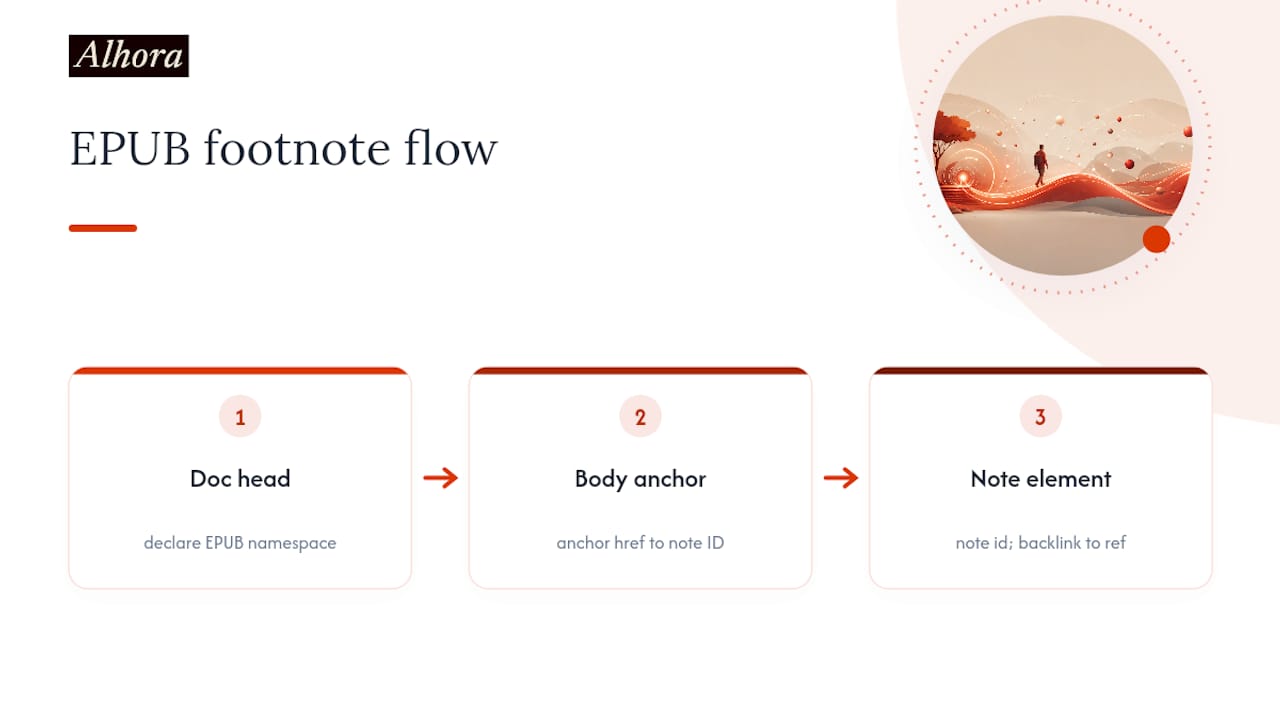
A minimal pattern is as follows:
<p>Diplomacy is theater<a epub:type="noteref" role="doc-noteref" href="#fn1" id="fnref1">1</a>.</p>

<aside epub:type="footnote" role="doc-footnote" id="fn1">
  <p>1. <a href="#fnref1">↩</a> This idea traces to Kissinger's early writing on statecraft.</p>
</aside>
That reciprocal link, reference to note and note back to reference, is what practitioners call bidirectional hyperlinking, and it is standard advice for keeping readers from getting stranded in the endnotes.
Pop-up notes vs. grouped endnotes
You have two structural choices, and they are not interchangeable:
- In-chapter pop-ups work well for short, single-sentence clarifications. Readers on Apple Books get a floating overlay without losing their place.
- Grouped endnotes at the chapter or book's end suit longer academic notes, source citations, or anything with formatting that might not render cleanly in a small pop-up window.
Choose based on note length and density, not personal preference. A novel with the occasional translation note behaves differently than a nonfiction title with 200 scholarly citations.
Tool-specific realities
Most authors don't hand-code EPUB. Here's how the common tools behave:
- Word-generated footnotes convert inconsistently. Word's native footnote feature often exports as endnotes with broken or missing backlinks once run through a conversion pipeline, so always spot-check the output HTML.
- Scrivener handles inline footnotes reasonably well during compile, but you should verify the epub:type attributes survive the export. Scrivener doesn't always add them automatically, which means a manual pass in the generated HTML is often necessary.
- Direct HTML/EPUB editing gives you full control and is the only reliable way to guarantee the noteref and footnote pairing plus the ARIA roles land correctly.
Kindle deserves a separate mention. Amazon's ecosystem historically favors end-of-chapter or end-of-book endnotes over in-line pop-ups, so if KDP is your primary channel, structure notes as grouped endnotes and validate the result in Kindle Previewer before you publish.
Pro Tip: Build your footnote markup once as a template snippet, then reuse it for every note in the manuscript. Hand-typing the ID pairs note by note is where typos creep in and backlinks quietly break.
If you're formatting cross-references elsewhere in the book, the same anchor logic applies. Alhora's guide to EPUB cross-references covers the export and testing side of that overlapping technique.
How Do Screen Readers Handle Footnotes?
Screen readers rely on ARIA roles to know a link is a note reference rather than a regular hyperlink. Adding role="doc-noteref" to the anchor and role="doc-footnote" to the note container gives assistive technology explicit signals to navigate between the two, according to DAISY's notes guidance. Without those roles, a screen reader user has to guess whether a superscript number leads anywhere useful.
There's a second, smaller fix that matters more than it sounds: skip the <sup> element where you can. Screen readers frequently announce "superscript" out loud before reading the number, which turns one footnote marker into an unnecessary mouthful. DAISY recommends styling a plain anchor with CSS instead:
.footnote-ref {
  vertical-align: super;
  font-size: 0.75em;
}
That preserves the visual look readers expect while cutting the verbal noise for anyone using assistive technology. Pair it with an aria-label like "Footnote 3" on the anchor itself, and the announcement becomes clean and predictable.
- Add
role="doc-noteref"to every note trigger,role="doc-footnote"to every note container. - Style superscript numbers with CSS, not
<sup>. - Write backlink text that says something, not just an arrow glyph with no label.
- Always include a backlink, since it removes any dependency on whether a reading system supports pop-ups.
That last point isn't optional generosity. Backlinks and ARIA roles together are treated as essential rather than nice-to-have among accessibility-focused developers, because they remove the note experience from depending on any single reading system's pop-up implementation.
For citation itself, ebooks rarely carry stable page numbers across devices and font sizes. The accepted workaround, per UCL's library guide on citing ebooks, is to cite by chapter, section, or paragraph marker instead of a page number that won't match on every screen.
What's the Best Way to Test Footnotes Before Publishing?
Markup that looks correct in your editor can still fail silently on a real device. Run through this sequence before you export final files:
- Validate with EPUBCheck first. It flags malformed
epub:typeattributes and missing ARIA roles before you waste time on manual device checks. - Preview on at least three systems: Apple Books for pop-up behavior, Kindle Previewer for navigation behavior, and Thorium or Readium as an open-standards check. Reading-system support for footnotes is genuinely inconsistent, so one clean preview doesn't mean you're done.
- Test with a keyboard and a screen reader. Tab to a note reference, activate it, confirm focus lands on the note, then confirm the backlink returns focus to the original sentence.
- Check contrast and reading order on the note text itself, since footnote CSS often gets less attention than body text and ends up too light or oddly ordered.
If a note fails to pop up and instead jumps you to the end of the file, that's not necessarily a bug. It's the fallback behavior working as intended. The fix that actually matters is checking whether the backlink got you back safely.
Pro Tip: Keep a spare copy of your EPUB with backlinks stripped out. Testing what happens without them shows you exactly how bad a reader's experience gets on a device with no pop-up support, and it makes the case for backlinks obvious fast.
Common Footnote Mistakes and How to Fix Them
- Endnotes that lose their links after conversion. Word-to-EPUB pipelines are the usual culprit. Check the exported HTML directly, and hand-fix the ID pairing if the automated export dropped it.
- Screen readers announcing "superscript" repeatedly. Swap
<sup>for a CSS-styled anchor. - Readers stranded after tapping a note. Missing backlinks. Add one to every single note, no exceptions.
- Overloaded pop-ups with tables or images. Long or complex content may not render well inside a pop-up window. Group these as endnotes instead and link clearly from the body text.
Why These Choices Matter in Production
Formatters treat semantic markup and backlinks as non-negotiable for one practical reason: manuscripts arrive with footnotes built in Word, Scrivener, or raw HTML, and each tool handles the export differently. Enforcing the same epub:type and ARIA pattern every time is what keeps output predictable across three or four publishing platforms at once.
Automated preflight checks exist because human eyes miss the small stuff, a missing backlink here, a <sup> tag left in there. Alhora's checks flag those markup and ARIA gaps before export, without touching your actual note text. For dense scholarly manuscripts with dozens of citations, grouped endnotes almost always beat pop-ups, since no reading system handles fifty stacked pop-up windows gracefully.
An Editorial Take on Footnote Best Practices
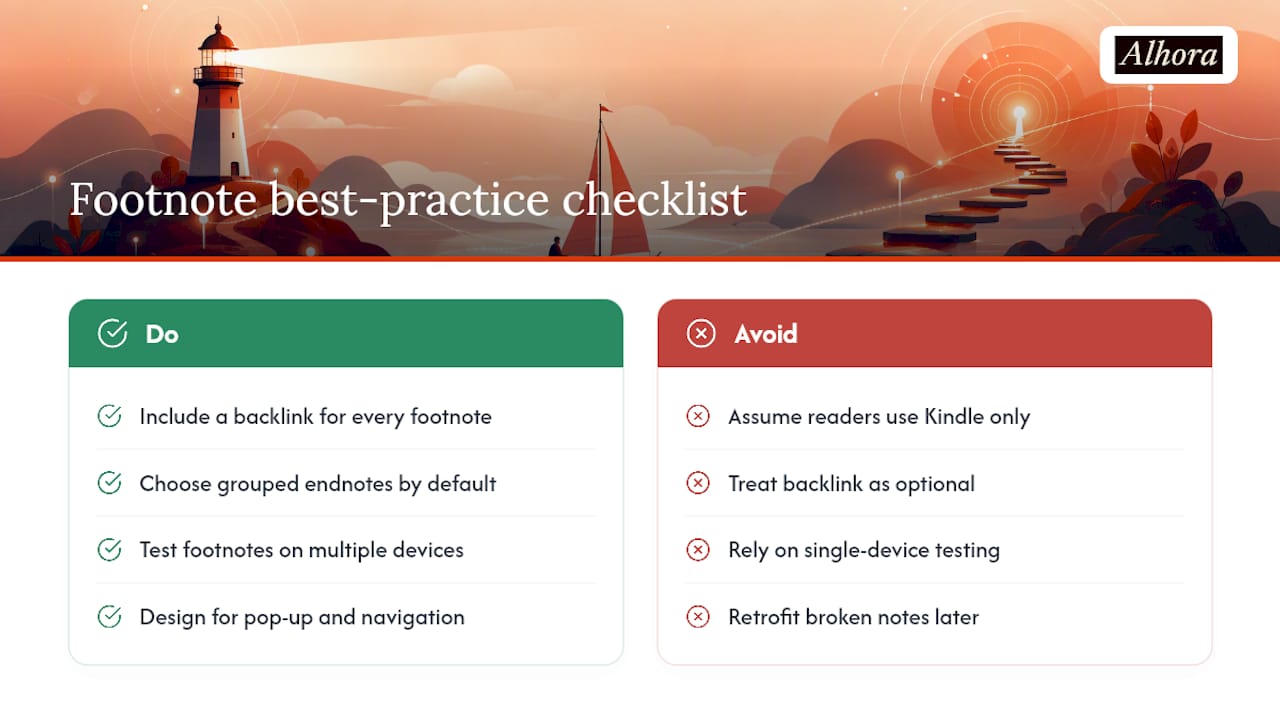
Most footnote advice online treats the EPUB spec like the finish line. It isn't. The markup takes ten minutes to learn. The part authors skip, and the part that actually causes reader complaints, is testing on more than one device and trusting that a backlink is optional because "most readers use Kindle anyway."
That assumption is where things go wrong. Display behavior varies enough across reading systems that a footnote perfect on Apple Books can strand a reader on an older Kobo. My take: treat the backlink as mandatory infrastructure, not a nice accessibility bonus, and pick grouped endnotes by default unless your notes are genuinely one line long. Authors who plan for both pop-up and navigation behavior see fewer reader complaints, and that single habit is cheaper to build in at drafting time than to retrofit after fifty reviews mention broken notes.
— James
Get Your Footnotes Export-Ready with Alhora
Some book formatting software checks critical markup elements such as correct epub:type attributes, appropriate ARIA roles, backlink presence on every note, and platform-specific export behavior for Kindle, Apple Books, Kobo, and other platforms. Its preflight audit flags a missing backlink or a malformed noteref before you ever upload to KDP, so you're not discovering the problem in a one-star review.
If your manuscript already has footnotes drafted in Word or Scrivener, Alhora's ebook formatting software will carry that structure into export-ready EPUB, validate the markup automatically, and flag anything that needs a manual fix, all without rewriting a single word of your actual notes. For anyone publishing through Amazon specifically, the KDP formatting service handles the end-of-chapter endnote conventions Kindle prefers. Import your manuscript and run a preflight check before your next export.
Sources
- W3C EPUB specs discussion — Best practices for footnotes
- UCL library guide — citing e-books
- eBooks StackExchange — How can I put footnotes in an ebook?
FAQ
How do I see footnotes in Kindle?
Tap or click the superscript number, and depending on the device, either a pop-up appears or you're navigated to the note at the chapter's end. Kindle tends to favor end-of-chapter placement, so structure notes accordingly and confirm behavior in Kindle Previewer.
How do you properly cite an ebook?
Since ebooks rarely have fixed page numbers, cite by chapter, section, or paragraph marker instead, following the format UCL's citation guide recommends for e-books without stable pagination.
How do audiobooks handle footnotes?
Audiobooks generally can't replicate visual footnotes, so narrators either read the note content inline where it appears, skip it entirely, or the publisher moves essential note content into the main narrative during adaptation.
What is an example of a footnote in an ebook?
A superscript number in the body text links to a short note, either a pop-up window on modern readers or a jump to grouped endnotes at the chapter's end, built using epub:type="noteref" paired with epub:type="footnote" markup.
Do I need a backlink on every single footnote?
Yes. A backlink is what lets a reader return to their original spot on any device that doesn't support pop-ups, and it's treated as essential rather than optional across accessibility guidance.