
An EPUB accessibility checklist worth using maps every requirement to EPUB Accessibility 1.2 and the Web Content Accessibility Guidelines, with WCAG 2.0 Level A as the required floor and WCAG 2.x Level AA as the recommended target. A conforming EPUB needs work across six areas, and a checklist that skips any of them will pass validation while still failing real readers.
The six areas are:
- Package metadata — accessMode, accessModeSufficient, accessibilityFeature, accessibilityHazard, and accessibilitySummary declared in the package document
- Content markup — reading order, heading structure, alt text, and language tagging inside the content documents
- Navigation — the nav document, table of contents order, landmarks, and page lists
- Media — captions, transcripts, and synchronized text-audio with skippable structures
- Distribution — making sure metadata and structure survive the trip through retailers and DRM wrappers
- Conformance and testing — the dcterms:conformsTo statement, certifier metadata, and a testing workflow that combines automation with human review
Every item below traces back to a specific clause in EPUB Accessibility 1.2, its companion Techniques document, or the WCAG success criteria they reference. Treat the specs as the normative source; treat this checklist as the working copy you actually use during production.
Key Takeaways
A conforming EPUB requires WCAG 2.0 Level A at minimum, WCAG 2.x Level AA recommended, and complete accessMode, accessibilityFeature, and navigation metadata to pass certification.
| Point | Details |
|---|---|
| Meet the WCAG floor | Target WCAG 2.0 Level A as the minimum and WCAG 2.x Level AA as the recommended standard for every title. |
| Metadata blocks certification | Missing accessMode, accessibilityFeature, or accessibilitySummary properties can fail certification even when content itself is accessible. |
| Reading order needs human eyes | Automated validators catch missing properties but cannot judge alt text quality or verify true linear reading order. |
| Test across reading systems | Check rendering in Apple Books, a Readium-based reader, and Microsoft Edge, plus at least one screen reader per platform. |
| Build it into typesetting | Alhora's audit-gated accessible EPUB export and AI-assisted checks catch structural and metadata gaps during production, before manual review begins. |
Table of Contents
- The EPUB Accessibility Checklist You Can Copy Into Your Workflow
- What Package Metadata Do You Need for Discoverability?
- How Do You Fix Reading Order, Headings, and Image Descriptions?
- How Should Navigation and Page Structure Work in an EPUB?
- What Do Captions and Synchronized Audio Actually Require?
- Does Your Distribution Pipeline Preserve Accessibility Metadata?
- How Do You Report Conformance and Certification Correctly?
- How Do You Actually Test an EPUB for Accessibility?
- Why Accessibility Belongs in Typesetting, Not Cleanup
- How Alhora Fits Into an Accessibility-First Production Process
- Frequently Asked Questions
- Sources
The EPUB Accessibility Checklist You Can Copy Into Your Workflow
This is the version you paste into a task tracker. Each line maps to a spec section, and each is tagged for whether a validator can check it or whether it needs a person to look.
Package metadata
- accessMode is declared and reflects every sensory channel the content uses (textual, visual, auditory). Automated.
- accessModeSufficient lists at least one combination that lets a reader with a single sense fully use the book. Automated + human sanity check.
- accessibilityFeature enumerates real features present (structural navigation, alternative text, captions). Human review.
- accessibilityHazard flags flashing content, motion, or sound hazards, or explicitly states "none." Human review.
- accessibilitySummary is a plain-language note describing known gaps. Human authored.
- dcterms:conformsTo names the exact conformance profile and WCAG level claimed. Human review, per EPUB Accessibility 1.2.
Content documents
- Reading order in the spine matches the order a sighted reader would follow visually. Human review.
- Headings form a single logical hierarchy with no skipped levels. Automated + human.
- Every meaningful image has alt text; decorative images are marked so assistive technology skips them. Human review.
- The document language is set with xml:lang, and any passages in another language are tagged separately. Automated.
Navigation
- The nav document exists and its TOC order matches the linear reading order. Automated + human.
- Landmarks mark the start of body matter, back matter, and any glossary or index. Human review.
- A page list is present if the print counterpart has fixed page numbers. Human review.
Media
- Video has captions; audio has a transcript. Human review.
- Synchronized text-audio playback includes every visible word, with skippable and escapable structures marked, per EPUB Accessibility Techniques. Human review.
Distribution and conformance
- Metadata survives conversion by the distributor and appears unchanged in the ONIX or retailer feed. Manual spot check post-upload.
- DRM does not block assistive technology from reading the file. Human review, tested per platform.
- a11y:certifiedBy and a11y:certifierReport are present if a third-party audit was performed. Human authored.
Automated tools catch missing properties and broken structure fast. They cannot tell you whether an alt text description is actually useful, or whether a sidebar was tagged as a footnote by mistake. Budget time for both.
What Package Metadata Do You Need for Discoverability?
Metadata is not paperwork you bolt on after export. It is the mechanism by which a retailer, a library system, or a screen reader user finds out whether your book will work for them before they buy it. EPUB Accessibility 1.2 treats metadata as serving two jobs at once: consumer discovery and formal conformance record.
accessMode and accessModeSufficient. accessMode describes every sensory channel the content actually uses, most commonly textual and, for illustrated or comic titles, visual. accessModeSufficient goes further: it names at least one combination of modes that, on its own, delivers the full content. A novel with no images typically declares textual for both properties. An illustrated cookbook with meaningful photos needs textual, visual for accessMode, but should still list textual alone under accessModeSufficient if every image has adequate alt text, because that tells a blind reader the book remains fully usable through text alone.
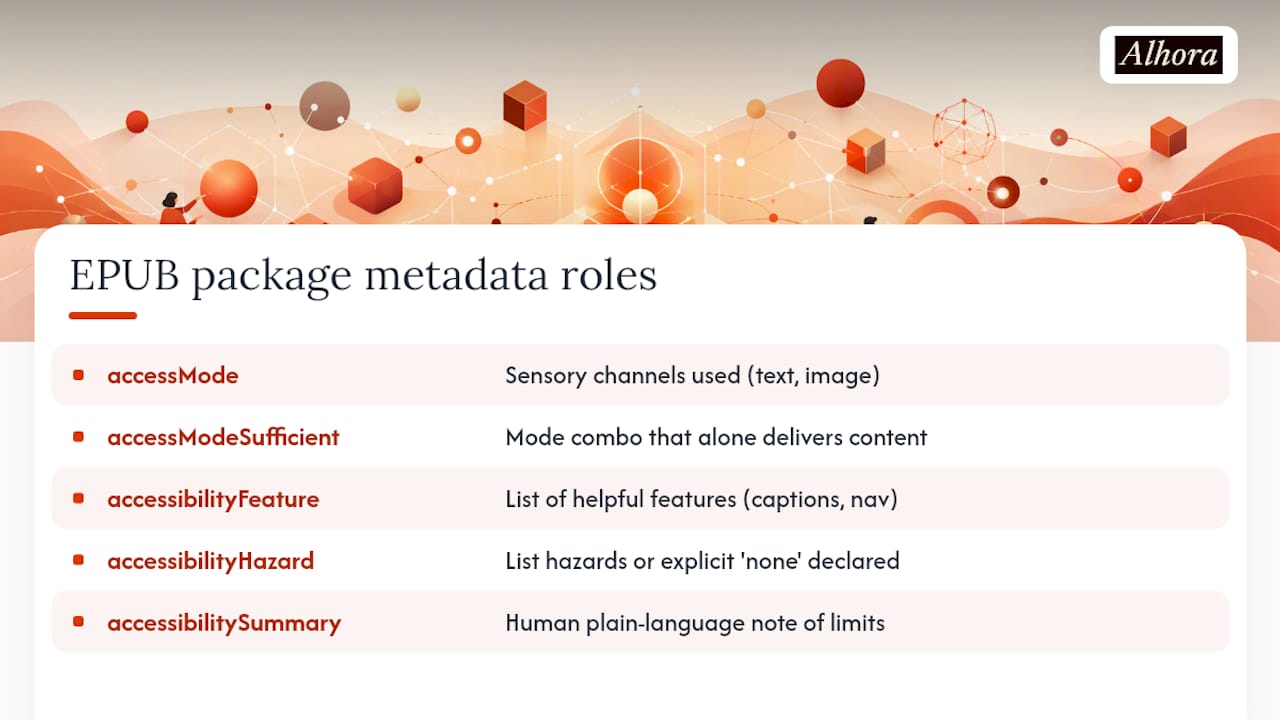
accessibilityFeature and accessibilityHazard. accessibilityFeature is a list, not a single value. A well-tagged EPUB might declare tableOfContents, readingOrder, alternativeText, and structuralNavigation together. accessibilityHazard works the same way in reverse: list every hazard present (flashing, motionSimulation, sound) or declare none explicitly. Leaving this property out entirely is different from declaring no hazards exist, and validators plus retailers treat an absent property as unverified rather than safe.
accessibilitySummary. This is the one property that has to be written by a person, in plain language, because its job is to say what the metadata properties can't. A summary might read: "This EPUB meets WCAG 2.1 Level AA. Complex charts in Chapter 4 include text-based data tables as an alternative." That single sentence tells a librarian or accessibility procurement officer exactly what they're getting, including where the limits are. Publishing an honest summary does more for buyer trust than a spotless-looking but vague one.
dcterms:conformsTo and a11y:certifiedBy. dcterms:conformsTo states the exact conformance profile claimed, typically a URI pointing to the EPUB Accessibility 1.2 profile at a named WCAG level. a11y:certifiedBy names the organization or individual who evaluated the file, if a formal audit happened.
One habit causes more failed certifications than any content defect: publishers finish the accessibility work and then forget to write the metadata that proves it, so a book that genuinely meets WCAG 2.0 Level A gets rejected during procurement simply because nobody declared it. Build metadata into your production template before the first chapter is typeset, not after.
Discoverability doesn't stop at the package document. Copy the same accessMode, accessibilityFeature, and accessibilitySummary values into your ONIX distribution record or retailer metadata feed. A perfect EPUB with accessibility metadata that never makes it into the retailer listing is invisible to the reader trying to filter for accessible titles in the first place.
How Do You Fix Reading Order, Headings, and Image Descriptions?
Content-level fixes are where most of the actual labor in an accessibility pass goes. Metadata takes an afternoon; getting the content documents right takes a full editorial cycle. Work through these in order:
- Verify linear reading order across the whole spine. Open the file in a reading system and tab through it using only the keyboard. If a sidebar, pull quote, or footnote interrupts the narrative flow in a way a sighted reader wouldn't experience, the underlying markup order is wrong, not just the visual layout.
- Match the TOC to that same linear order. A table of contents that jumps around relative to the spine confuses screen reader users navigating by heading, even if the visual page order looks fine.
- Check the heading hierarchy for skipped levels. A book title sits at the top; chapter titles follow at the next level down; sections within a chapter go one level deeper still. Never jump from a heading level 1 straight to a level 3 because it "looked right" in a stylesheet.
- Write alt text for every meaningful image, describing what the image communicates, not just what it depicts. A bar chart's alt text should state the trend and key numbers, not just say "chart."
- Add extended descriptions for complex images that alt text can't cover in a sentence or two. A diagram, map, or multi-panel infographic usually needs a longer description linked from the image, not crammed into the alt attribute.
- Mark purely decorative images so assistive technology skips them, using an empty alt attribute rather than omitting the attribute entirely.
- Set the document language with xml:lang at the file level, and tag any embedded foreign-language phrase or quotation separately so a screen reader switches pronunciation correctly.
- Use ARIA only where native HTML semantics fall short. A properly marked-up
<nav>,<h2>, or<table>needs no ARIA role at all. Reach for ARIA landmarks or roles only for genuinely custom widgets, since redundant ARIA on native elements can confuse more assistive technology than it helps.
The reading-order and heading checks matter most because they're invisible in a visual proof but immediately obvious to anyone using a screen reader. A book can look flawless in Adobe Digital Editions and still be unreadable in linear order for a blind reader if the underlying spine sequence is off.
How Should Navigation and Page Structure Work in an EPUB?
The navigation document is the single file that tells a screen reader, a switch device, or a low-vision reader using a braille display how the book is organized. Get it wrong, and every other accessibility fix in the file becomes harder to reach.
- Build the nav document with a proper table of contents list, and confirm every entry appears in the same order as the linear spine, not a curated or abbreviated order that diverges from it.
- Add landmark entries for front matter, body matter, back matter, and any glossary or index, so a reader can jump straight to the section they need instead of paging through the whole book.
- Include a page list if the title has a fixed-layout print counterpart with numbered pages, linking each entry to the corresponding pageBreakMarkers in the content.
- Declare pageBreakSource when page numbers come from a specific print edition, so readers citing page numbers in a classroom or academic setting can trust the reference.
- For reflowable EPUBs with no meaningful print pagination, skip the page list rather than inventing arbitrary page numbers that mislead readers who need to cite a print edition.
Pagination and reflowable layout pull navigation in different directions. A purely reflowable novel needs a clean TOC and landmarks and can skip page lists entirely. A textbook or academic title with a print edition in wide use needs the page list, because students and instructors will cite specific page numbers regardless of what format they're reading in. Decide which category your title falls into before you build the nav document, not after.
What Do Captions and Synchronized Audio Actually Require?
Multimedia accessibility in EPUB covers two distinct situations: standalone audio or video embedded in the book, and synchronized text-audio playback where narration follows along with on-screen text (the pattern used in read-along children's books and some accessible textbook formats).
- Every video needs captions; every standalone audio track needs a transcript. Neither is optional under a WCAG 2.0 Level A claim.
- Synchronized text-audio must include all visible text and any textual alternatives as spoken content, not an abridged or paraphrased version, per EPUB Accessibility Techniques.
- Mark skippable structures, like repeated navigation elements or front-matter boilerplate, so a reader relying on synchronized playback can jump past them instead of sitting through the same content every session.
- Mark escapable structures, like sidebars or footnotes, so playback can exit a digression and return to the main narrative without the reader losing their place.
- If sign language interpretation exists for a video, note it explicitly in accessibilityFeature rather than assuming captions cover the same ground.
When a title requires multiple renditions (say, a fixed-layout version alongside a reflowable one for the same content), at least one rendition needs to meet every accessibility requirement on its own. The EPUB Accessibility 1.2 spec requires that accessibilitySummary state this plainly, so a reading system or reader knows which rendition to reach for.
Document any unavoidable multimedia gap, like a video with no captions yet, directly in accessibilitySummary and in your distribution metadata rather than letting a retailer or reader discover it unannounced.
Does Your Distribution Pipeline Preserve Accessibility Metadata?
An EPUB can pass every accessibility check on your desk and still fail the reader if the distribution pipeline strips or scrambles what you built. This step gets skipped constantly because it happens after the file leaves your hands.
- Download the file back from at least one major retailer or distributor after upload and confirm the accessMode, accessibilityFeature, and accessibilitySummary properties are still intact.
- Check that the retailer's converted file preserves your reading order and navigation document rather than regenerating a flattened table of contents.
- Confirm dcterms:conformsTo and a11y:certifiedBy metadata survive the conversion, since some distribution pipelines strip properties they don't recognize.
- Test whether DRM wrapping on the retailer's side interferes with text-to-speech or screen reader access; some DRM schemes block the very copy-and-read functions assistive technology depends on.
- If DRM restricts assistive technology access, disclose that limitation in accessibilitySummary rather than leaving buyers to discover it after purchase.
- Re-run your validator on the distributor's converted output, not just your source file, since the two can diverge.
The gap between what you shipped and what a reader actually receives is usually invisible until someone files a complaint. Building a quarterly spot check into your workflow, downloading a sample title from each retail channel and re-validating it, catches drift before it becomes a support ticket.
How Do You Report Conformance and Certification Correctly?
A conformance claim is a specific, checkable statement, not a marketing line. Get the pattern right and you give buyers, librarians, and accessibility procurement teams something they can actually verify.
- State dcterms:conformsTo as a precise reference to the conformance profile and WCAG level claimed, for example a note that the title conforms to EPUB Accessibility 1.2 at WCAG 2.1 Level AA, not a vague "accessible" label with no standard named.
- Include a11y:certifiedBy naming the organization or individual who performed the evaluation, if the title went through a formal third-party audit.
- Add a11y:certifierCredential when the certifier holds a recognized accessibility credential, so buyers can weigh the evaluation's rigor.
- Link a11y:certifierReport to the actual evaluation document when one exists, rather than just asserting certification with nothing to back it.
- Never claim WCAG AA conformance metadata on a file that only meets Level A; the mismatch between stated and actual conformance is worse than under-claiming.
- Treat the metadata plus a published evaluator report as your transparency record, something buyers increasingly expect from publishers selling into institutional and library markets.
Publishers who skip the certifier fields aren't necessarily hiding anything. Most simply never had a formal audit done. But leaving these fields conspicuously blank on a title marketed as accessible reads differently to a procurement officer than declaring "self-assessed, no formal audit" directly in accessibilitySummary. Say which one it is.
How Do You Actually Test an EPUB for Accessibility?
Validation happens in layers, and skipping any one of them leaves gaps a reader will find before you do. Here's the sequence that catches the most problems for the least wasted effort.
- Run automated structural and metadata linting first. A validator should flag missing accessMode, malformed heading hierarchies, missing alt attributes, and broken nav document references in minutes, before anyone reads a single page.
- Run WCAG-focused checks against the rendered HTML. Automated tools can smoke-test color contrast, missing ARIA labels on custom widgets, and basic alt text presence, though they cannot judge alt text quality.
- Do the manual human review. A trained reviewer walks the reading order start to finish, evaluates whether alt text actually describes what matters, confirms heading semantics reflect real document structure, checks that complex tables have proper header associations, and listens to synchronized audio for sync accuracy. Automated tools miss all of this, and the DAISY knowledge base is blunt about why: EPUB-specific structures like footnotes and sidebars need contextual human judgment that pattern matching can't replicate.
- Test across a reading-system matrix, not just one app. A shortlist worth keeping on hand includes Apple Books on iOS and macOS, a Readium-based reader for desktop and browser testing, and Microsoft Edge's EPUB support, alongside at least one screen reader per operating system you test on. Run this matrix at least once per title before release, and again after any major distributor conversion.
Pro Tip: Keep a running log of which reading system caught which bug. Patterns emerge fast, and you'll often find one particular app consistently mishandles a structure the others render fine, which tells you exactly where to focus your next manual pass.
Alhora's audit-gated accessible EPUB export handles a meaningful chunk of Step 1 automatically, flagging missing metadata properties and structural issues before export, and its AI-assisted checks can surface likely alt-text gaps or heading inconsistencies during Step 2 and 3. Neither substitutes for a human reading through the file. The AI layer suggests what to look at; it does not write your alt text or judge whether a description is actually useful to a blind reader. That judgment call stays with a person every time.

Why Accessibility Belongs in Typesetting, Not Cleanup
The biggest mistake I see in accessibility work is treating it as a final pass, something a production team runs the week before launch, after the manuscript is already locked into its visual design. By that point, fixing reading order usually means re-touching the layout, and fixing headings means renegotiating a stylesheet everyone thought was finished. Build accessibility into the typesetting stage instead, and most of the expensive rework disappears before it starts.
If you have to prioritize, do it in this order: metadata first, because it costs almost nothing and blocks certification entirely if skipped. Reading order and heading structure second, because they're expensive to fix late. Alt text third. Richer media features like synchronized audio and captions last, since they usually apply to a smaller subset of titles anyway.
Publish your evaluator reports when you have them, and keep your accessible source files under version control. A publisher who can show their work builds more trust than one who just attaches a badge.
How Alhora Fits Into an Accessibility-First Production Process
Alhora is the alternative to bolting accessibility onto a finished file after the fact. Instead of exporting an EPUB and then running a separate audit to find out what broke, Alhora's audit-gated accessible EPUB export checks package metadata, heading structure, and navigation requirements as part of the export itself, so problems surface while you can still fix them in minutes rather than days.
The platform's typesetting engine handles the structural groundwork automatically: consistent heading hierarchy, correct reading order across the spine, and clean navigation documents that match your table of contents to your linear content. Its AI-assisted checks flag likely gaps, a missing alt attribute, an accessibilityHazard property left blank, a heading level that skips a step, without ever writing or rewriting your text. You stay the author of every word; Alhora just makes sure the structure around those words holds up under a screen reader.
None of this replaces the manual review your content still needs, particularly for alt text quality and complex image descriptions. What it does is clear away the mechanical errors before a human reviewer ever opens the file. If you're formatting a manuscript for KDP, IngramSpark, Apple Books, or Kobo and want the accessibility groundwork handled as part of typesetting rather than after it, start with Alhora and see how much of this checklist it clears before your review even begins.
Frequently Asked Questions
What is the minimum WCAG level required for EPUB accessibility compliance?
EPUB Accessibility 1.2 requires WCAG 2.0 Level A as the floor for conformance, but WCAG 2.x Level AA is the recommended target most publishers and institutional buyers now expect.
Which parts of an EPUB accessibility checklist can be automated?
Automated tools reliably catch missing metadata properties, broken navigation references, heading level errors, and missing alt attributes. They cannot judge whether an alt text description is actually useful or verify that reading order matches visual intent, which is why human review stays essential.
Does every EPUB need a certifier report to claim accessibility?
No. A publisher can self-assess and state that plainly in accessibilitySummary. A certifier report and a11y:certifiedBy metadata add credibility for institutional buyers, but they're not required to make a valid conformance claim under EPUB Accessibility 1.2.
How is EPUB accessibility different from general web accessibility?
EPUB is built on Open Web Platform technologies, so WCAG applies directly, but book-specific structures like footnotes, page lists, and landmarks need EPUB-specific mapping rather than a literal port of web techniques, according to DAISY's guidance.
What happens if a distributor strips accessibility metadata during conversion?
The published file can fail accessibility requirements even though your source file conformed. Always download a sample from each distribution channel after upload and re-verify that accessMode, accessibilityFeature, and conformance metadata survived the conversion intact.
Do fixed-layout EPUBs need the same accessibility treatment as reflowable ones?
Fixed-layout titles still need accessMode, accessibilityFeature, and alt text for images, along with a logical reading order defined in the markup even though the visual layout is locked. Page lists become more relevant here since fixed layouts often mirror a specific print edition.