
Every working cross-reference in an EPUB points to a stable semantic anchor, either an HTML id attribute or an EPUB Canonical Fragment Identifier, never a printed page number. Reflowable EPUBs resize text to fit whatever font and screen a reader chooses, so "see page 73" becomes meaningless the moment someone bumps the font size up two notches. The fix is to link into the document's structure instead of its pagination, validate the result with EPUBCheck, and confirm behavior matches Amazon KDP's hyperlink rules before you publish.
A link that survives a font-size change, a device swap, and three rounds of manuscript edits was built on an id or a CFI. A link that survives none of those was built on a page number.
Before you touch a single export setting, run through this:
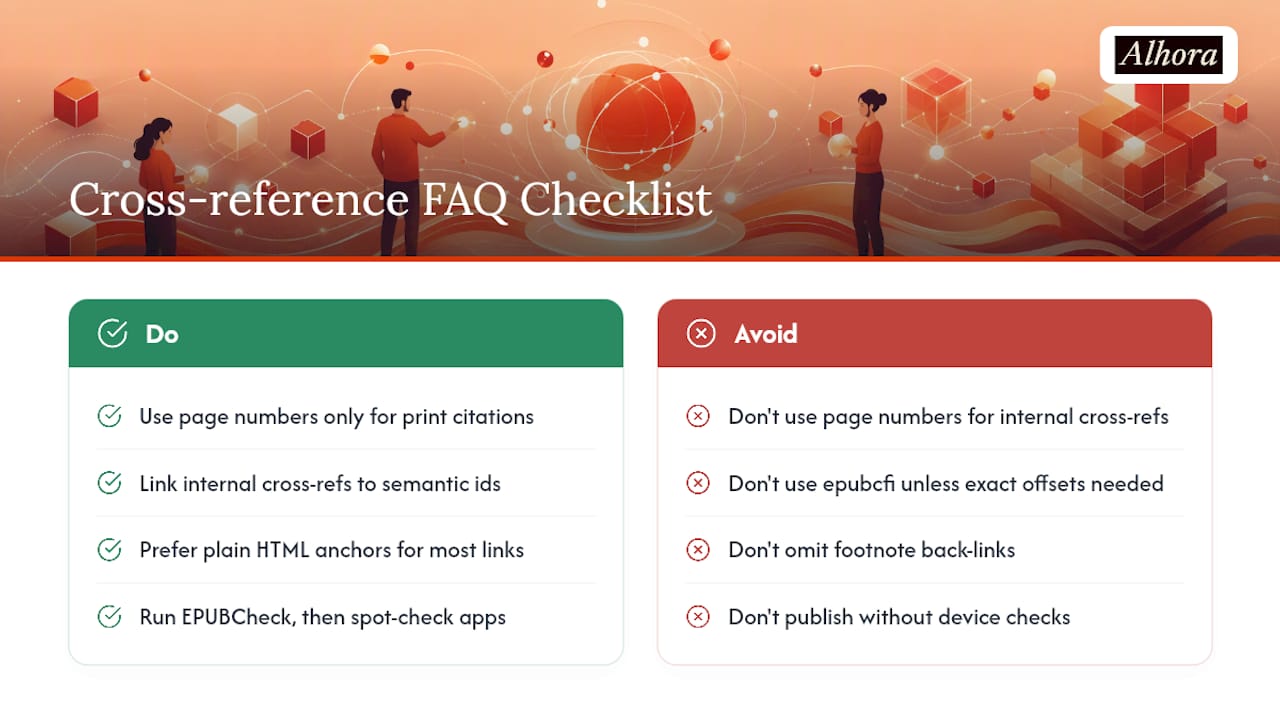
- Replace every "see page X" reference with a link to a semantic id.
- Reserve epubcfi for precise offsets, ranges, or generated content that needs exact addressing.
- Validate the finished file with EPUBCheck before you call it done.
Key Takeaways
Reliable EPUB cross-references depend on semantic ids or epubcfi targets, exporter-aware conversion, and validation with EPUBCheck before publication.
| Point | Details |
|---|---|
| Never link page numbers | Reflowable EPUBs resize text, so page-number references break; link to stable ids instead. |
| Use epubcfi sparingly | Reserve EPUB Canonical Fragment Identifiers for offset-level or range-based precision, not everyday links. |
| Match footnote rules to platform | Bi-directional links belong to footnotes only; ordinary cross-links should stay one-directional per KDP guidance. |
| Validate before release | Run EPUBCheck, then spot-test on Apple Books, Kobo, and Kindle Previewer plus real hardware. |
| Automate what you can | Alhora handles id assignment, exporter mapping, and batch EPUBCheck validation as part of its export workflow. |
Table of Contents
- How cross-references map into an EPUB package
- Converting page-number references and export best practices
- Footnotes, bi-directional links, and platform rules
- Tools and practical workflows for reliable links
- Validation and testing matrix
- Copy-paste examples for anchors and links
- Troubleshooting broken or misrouted links
- How Alhora removes the manual link-fixing burden
- Frequently Asked Questions
- Sources
How cross-references map into an EPUB package
An EPUB is a ZIP archive of XHTML documents, stitched together by a spine that lists reading order through itemref elements. When you cross-reference something inside that package, the link has to resolve to a fragment inside one of those XHTML files, not a coordinate on a printed sheet.
The simplest and most compatible method is a standard HTML id attribute. Give a heading, paragraph, or figure a unique id, then point an anchor tag's href at filename.xhtml#that-id. Every reading system handles this correctly because it is ordinary HTML, not an EPUB-specific extension.
EPUB CFI exists for cases plain IDs can't handle: addressing a specific character offset inside a paragraph, defining a range that spans multiple elements, or targeting content that gets regenerated during production. It's more precise, but fewer tools construct and resolve it reliably compared to a plain fragment identifier, so treat it as a specialist tool, not a default.
- Use plain
idanchors for chapters, headings, footnotes, and figures. - Reserve epubcfi for offset-level or range-based precision.
- Never mix numbering schemes between the two inside the same book.
Pro Tip: Adopt a naming convention before you write a single cross-reference, something like ch04-fig02 or sec3-para14. Automated tools can then rename or renumber content without orphaning every link that points to it.
Converting page-number references and export best practices
Print manuscripts are full of "see page 73" and "as discussed on page 12." None of that survives conversion, so you need a conversion pass before export, not after.
- Search the manuscript for every page-number reference.
- Identify the target element, a heading, a callout, a specific paragraph, and assign it a stable id.
- Replace the page-number text with a link to that id, using a label like "Chapter 4" or "Figure 2" instead of a number.
- Re-export and spot-check that the link lands exactly where intended.
Toolchains complicate step three. In Asciidoctor, a cross-reference between chapters in EPUB3 often renders as the chapter's title instead of a styled "Chapter 4" label, because EPUB3 treats chapters as separate documents in a way PDF and HTML output don't. The documented workaround is setting an explicit docreftext attribute, though that means maintaining numbering by hand rather than relying on automatic generation.
- Check whether your exporter strips
hrefattributes during conversion. - Confirm chapters that get split into separate XHTML files still resolve their internal links correctly.
- Re-run the whole conversion after any structural edit, not just after content edits.
Pro Tip: Do the page-to-id conversion in your source document, before export, not by hand-editing the generated EPUB afterward. Every re-export otherwise wipes out your fixes.
Footnotes, bi-directional links, and platform rules
Footnotes and ordinary cross-references follow different rules, and mixing them up creates a genuinely annoying reading experience. Amazon's hyperlink guidelines specify that footnotes should use bi-directional links, one pointing from the reference mark to the note and another pointing back, while ordinary cross-links should not be reciprocal.
Reserve bi-directional linking for footnotes only. Apply that same pattern to a regular chapter cross-reference and some reading systems will treat it like a footnote, popping up a preview window the reader never asked for.
Fixed-layout EPUBs add another wrinkle. They don't support external links the way reflowable EPUBs do, and internal hyperlink support varies more by device and app.
- Link footnotes both ways; link everything else one way only.
- Test fixed-layout files separately from reflowable ones, since their link behavior isn't identical.
- Check your specific publishing platform's guidelines before assuming KDP's rules apply everywhere.
Tools and practical workflows for reliable links
Different production pipelines handle cross-references differently, and knowing each tool's quirks in advance saves a lot of debugging later.
Adobe InDesign supports hyperlinks and cross-references for indexes, footnotes, and endnotes, but exported behavior depends heavily on the reading system. Specialized plugins from vendors like Circular Software add export-time controls for making sure hyperlink tap targets are actually large enough to hit on a phone screen.

Asciidoctor, Pandoc, and Bookdown pipelines generally handle plain-text cross-references well but can mishandle chapter-spanning references or drop styling. Bookdown users have reported links that redirect to the top of a chapter instead of the specific anchor, usually traced back to a mismatch between the href name and the actual id in the generated XHTML.
Calibre is useful less for authoring and more for inspection: converting through it or opening a file's internals lets you confirm what an EPUB actually contains after another tool has processed it.
- Keep semantic IDs in your source files, not just in the exported output.
- Check exporter settings for anything that touches link or anchor generation before you trust a default.
- Never rely on page-based links surviving a source-to-EPUB conversion.
- Unzip the finished
.epub, open the XHTML files directly, and search for any anchor that has no matching id.
Validation and testing matrix
EPUBCheck is the standard validator for EPUB packages, and it flags a specific class of problems: missing ids, broken internal references, malformed spine entries, and structural violations against the EPUB specification. Running it isn't optional if you want a file that behaves consistently across reading systems.
- Run EPUBCheck against the finished file and resolve every error before moving on.
- Manually click through internal links in at least one intermediate HTML preview.
- Spot-test on Apple Books, Kobo, and Kindle Previewer.
- Confirm footnote pop-up behavior specifically, since that's where platform differences show up most.
- Test on real hardware when you can. Previewers don't always reproduce native app behavior exactly.
- Treat a clean EPUBCheck pass as a minimum bar, not proof the book reads correctly everywhere.
Copy-paste examples for anchors and links
A working internal link is two matched pieces: an id on the target, and an href on the reference pointing at that id.
<!-- In chapter04.xhtml -->
<h2 id="ch04-sec02">The Turning Point</h2>

<!-- In chapter02.xhtml -->
<p>As explained in <a href="chapter04.xhtml#ch04-sec02">Chapter 4</a>, the pattern repeats.</p>
The id must be unique across the entire package, not just within its own file. Two elements sharing an id anywhere in the EPUB will break resolution for both.
For precision beyond a simple anchor, an epubcfi fragment looks something like epubcfi(/6/4[chap04]!/4/2/1:0), addressing a specific character offset inside a specific element. Reach for that only when a plain id can't express what you need.
- Unzip the packaged
.epubfile and open the XHTML directly to confirm the id exists exactly as written. - Confirm the href's filename and fragment match the target file and id character for character.
- Re-test after any renaming, since a single typo silently breaks the link with no visible warning.
Troubleshooting broken or misrouted links
A link that opens the right chapter but lands at the top instead of the intended paragraph almost always means the href fragment doesn't match an actual id in that file, sometimes because the id got renamed and the reference didn't. An EPUBCheck error like RSC-012 specifically flags a fragment that can't be resolved.
- Unzip the EPUB and search all XHTML files for the id referenced in the broken link.
- Confirm the href's filename and fragment spelling match the id exactly, including case.
- Check the spine and itemref order in the OPF file if content seems to have moved between files.
- Run EPUBCheck again after any fix and read the full error, not just the code.
- For Asciidoctor exports, verify
docreftextsettings weren't reset after a template update.
Editorial labels versus technical stability
Printed-style labels like "see Chapter 4" feel natural to readers but require manual upkeep across edits. The more durable approach: maintain semantic ids as the technical backbone, generate human-readable labels at export time, and keep a simple change log whenever an id gets renamed or removed.
How Alhora removes the manual link-fixing burden
Fixing broken cross-references by hand, chapter after chapter, edit after edit, is the least rewarding part of self-publishing. Alhora automates id assignment across a manuscript, maps references through exporter-aware logic so links survive conversion to KDP, IngramSpark, Apple Books, and Kobo formats, and runs batch EPUBCheck validation before a file ever reaches a reading device.
Instead of unzipping an EPUB to hunt for a mismatched id, or re-testing footnote pop-up behavior on three separate apps after every revision, the platform's audit-gated export process runs those checks as part of producing the file. That means fewer surprises after publication and less time spent doing QA work that a proper pipeline should handle automatically. If cross-reference errors have delayed a launch before, start a manuscript export with Alhora and see what a validated file looks like before it ever reaches KDP.
Frequently Asked Questions
Can I still use page numbers in an EPUB at all? Only for print-derived references that genuinely mean a fixed page, like citing a physical edition. For internal cross-references within the same EPUB, link to a semantic id instead, since reflowable text makes page numbers unreliable.
Does every cross-reference need epubcfi?
No. Plain HTML id anchors handle the vast majority of cross-references just fine. Save epubcfi for cases requiring exact character offsets or ranges that a simple id can't express.
Why do my chapter links open at the top instead of the right paragraph?
This usually means the href fragment doesn't match an actual id in the target file, often because the id changed during an edit or export. Unzip the EPUB, check the XHTML directly, and run EPUBCheck to confirm.
Should footnotes link back to their reference mark? Yes. KDP's guidelines specifically call for bi-directional links on footnotes, while ordinary cross-references should stay one-directional to avoid triggering unwanted pop-up behavior on some reading systems.
What's the fastest way to catch broken links before publishing? Run EPUBCheck first, since it flags unresolved fragments and structural errors directly. Follow that with manual spot-checks on at least two reading apps and, when possible, an actual device.
Sources
Ten habits separate a book with reliable internal links from one that generates support emails after launch:
- Hyperlink Guidelines
- Markdown cross reference links work in gitbook but NOT in ePub book (GitHub issue)