

The single best approach for authors who need platform-compliant files is a dedicated book-formatting and typesetting platform, not a word processor or a distribution retailer. Alhora stands out as a leading option in this category, producing EPUB 3 and print-ready PDFs that pass the technical checks retailers and distributors actually require.
Three outputs any serious formatting platform must deliver:
- EPUB 3 with a valid package document and navigation TOC, conformance-checked before distribution
- Print-ready PDF with correct trim, bleed, gutter, embedded fonts, and CMYK color space
- A proof simulator and physical proof ordering to catch layout errors before files go live
The sections below cover who needs this kind of platform, what the technical checklist looks like, how to evaluate your options, and exactly how Alhora maps to each requirement.
Table of Contents
- Who actually needs a professional formatting platform?
- What do the best self publishing platforms actually need to deliver?
- How do you evaluate formatting platforms against your project?
- How does Alhora map to the essential checklist?
- When should you format the book yourself, and when should you hire someone?
- Key Takeaways
- What the checklist reveals about how most authors actually fail
- Alhora gives you a clear path from manuscript to publish-ready files
- Useful sources for validating your work
Who actually needs a professional formatting platform?
Three groups consistently run into problems without one.
Indie authors preparing retail-ready EPUBs and print files for Amazon KDP, Apple Books, or Google Play Books. A Word export rarely passes a conformance check, and the errors only surface after upload.
Freelance book formatters delivering vendor-compliant files to clients. Their reputation depends on files that pass preflight the first time, not after three rounds of corrections.
Small publishers handling series or short-run titles. Batch formatting and version control matter here. Reformatting each title from scratch is the kind of work that kills margins on a six-book series.
Typical project profiles range from single-title fiction (reflowable EPUB, standard trim paperback) to illustrated children's books (fixed-layout EPUB, full-bleed color interiors) to trade nonfiction with complex front matter and footnotes. The common thread: compliance, fewer proof rounds, and consistent typography across every title.
What do the best self publishing platforms actually need to deliver?
The IBPA Industry Standards Checklist is the clearest benchmark available. It covers typography, production, proofs, cover legibility, and metadata. Here is what a platform must handle to meet it:
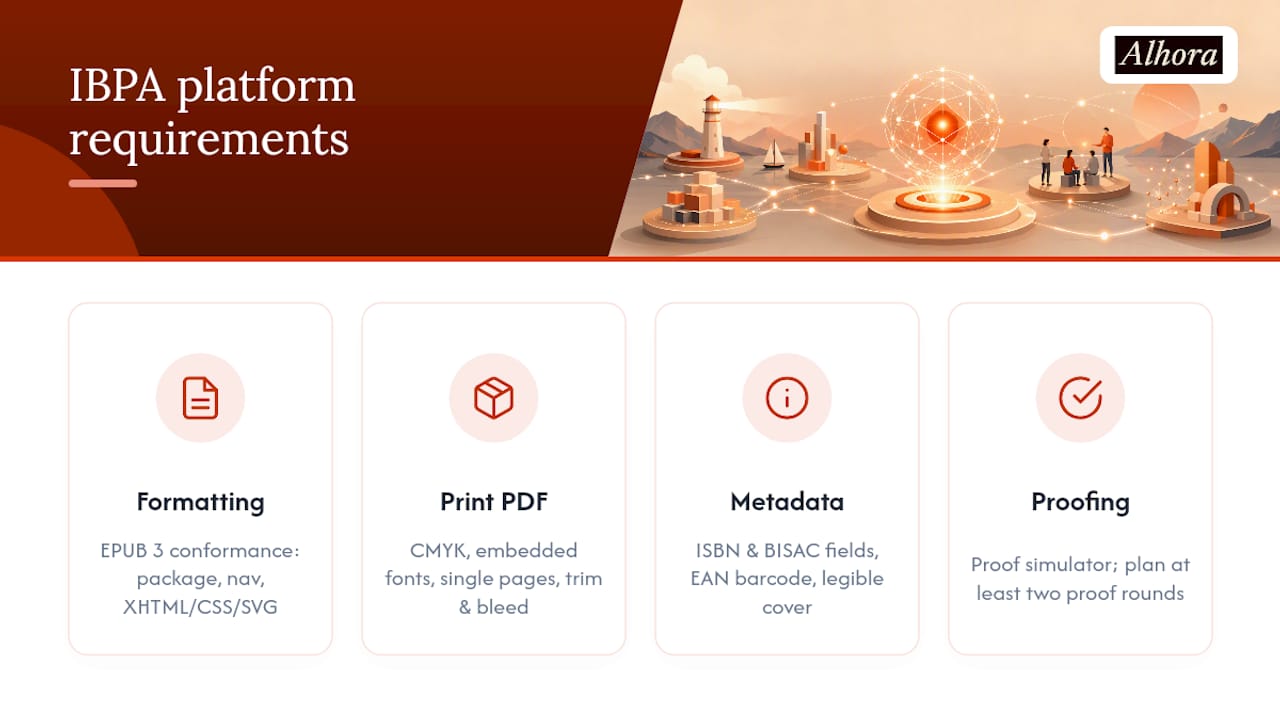
EPUB 3 conformance. The W3C EPUB 3 specification requires a package document, a navigation document, and correct encoding of structured content in XHTML, CSS, and SVG. Reflowable layouts work for most fiction and nonfiction; fixed layouts are required for illustrated books where position matters. Run every export through an EPUB conformance checker before uploading to any retailer.
Print-ready PDF. Per prepress specification guidance, a production-ready PDF requires CMYK color space, fully embedded fonts, single-page layout (no reader spreads), and correct trim, bleed, and safe-margin settings. Skipping preflight validation causes binding errors and color shifts at the printer.
Metadata and distribution readiness. ISBN and BISAC fields, an EAN barcode readable at thumbnail size, and a cover image that stays legible at small sizes on retail pages.
Accessibility. Semantic HTML structure, ARIA landmarks, tagged images with alt text, and a logical reading order. Accessibility checkers flag these before distribution.
Workflow integrations. Import support for Microsoft Word and Scrivener files keeps the editing-to-formatting pipeline clean. Export formats should target the specific requirements of major retailers.
Proofing. A proof simulator lets you catch widows, orphans, and layout breaks before ordering a physical proof. Plan for at least two proof rounds on any title with complex interior design.
Pro Tip: Favor fonts licensed under the Open Font License (Google Fonts is a reliable source) when supplying print-ready files. Font licensing responsibility typically falls on the author, and OFL fonts eliminate the friction of downstream redistribution and repackaging.
How do you evaluate formatting platforms against your project?
The right tool depends on your operating system, publishing goals, and design experience. There is no single universal answer, but the evaluation criteria are consistent.
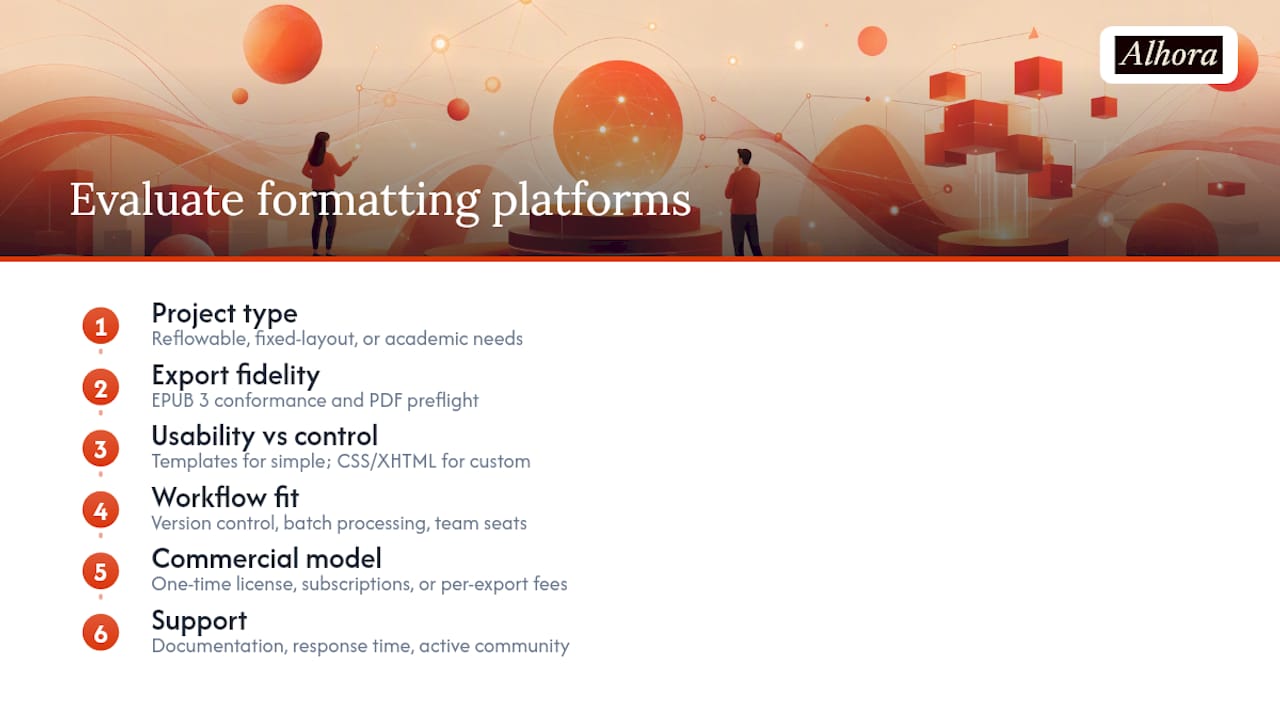
Project type first. Reflowable fiction needs clean paragraph styles and a valid TOC. Fixed-layout illustrated books need pixel-level control. Academic titles with equations or footnotes need a platform that handles complex typographic structures without breaking the EPUB package. Match the capability to the job before anything else.
Export fidelity. Does the EPUB 3 output pass a conformance checker? Does the print PDF pass a preflight check for CMYK, embedded fonts, and bleed? These are binary tests. A platform that fails them costs you time regardless of how good the interface looks.
Usability vs. control. Template-driven workflows get most authors to a clean file faster. CSS and XHTML control matters when you need custom drop caps, non-standard chapter openers, or genre-specific typography. Prioritize templates for straightforward projects; prioritize control for anything with a distinctive design brief.
Workflow fit. Version control and batch processing matter for publishers managing multiple titles. Team seats matter for studios where a formatter and an editor both need access.
Commercial model. A one-time license suits authors publishing infrequently. Subscriptions (monthly or annual) suit active publishers. Per-export fees add up fast on a series.
Support. Documentation quality, response time, and an active user community all reduce the cost of getting stuck on a technical problem at 11 PM before a launch deadline.
How does Alhora map to the essential checklist?
| Checklist requirement | Alhora capability |
|---|---|
| EPUB 3 export with conformance check | Audit-gated EPUB 3 export with validation before file release |
| Print-ready PDF (CMYK, embedded fonts, bleed/gutter) | Automated trim, bleed, gutter, and preflight checks built into the export workflow |
| Metadata and ISBN support | ISBN, BISAC, and metadata fields managed within the platform |
| Proof simulator and physical proof ordering | Built-in proof simulator plus physical proof ordering |
| Batch and series formatting | Batch export with template reuse across titles |
| Accessibility export and audit gate | Accessible EPUB export gated by an accessibility audit |
| Word and Scrivener import | Supported import formats for standard author workflows |
| Version control and team seats | Version control included; publisher-seat plans for teams |
| AI-assisted checks (non-generative) | Flags issues without altering creative content |
Alhora runs on Mac, Windows, Linux, and ChromeOS, which removes the OS friction that affects teams working across different machines. That cross-platform availability matters for small publishers where the formatter uses a Mac and the editor uses Windows.
Licensing options cover monthly, annual, and lifetime plans for individuals, with an optional AI add-on for editorial checks and team-based publisher seats for organizations. The AI engine flags potential issues but never writes or rewrites content, so authors keep full creative control.
To get started: run a sample export on a test manuscript, check the EPUB output against a conformance checker, and order a physical proof before committing to a final file. Those three steps surface most problems before they reach a retailer.
When should you format the book yourself, and when should you hire someone?
DIY formatting makes sense when the interior is straightforward (standard fiction or nonfiction, minimal images), the budget is tight, and you want iterative control over the final file. Comfort with software matters more than design experience for most reflowable titles.
Hiring a professional formatter makes sense in four situations: heavy illustration or full-bleed color interiors, complex academic or technical layouts with equations, tight retailer or distributor requirements you are not confident meeting yourself, and bulk series formatting where a publisher needs consistent output across many titles quickly.
| Project signal | DIY or hire? |
|---|---|
| Standard reflowable fiction, minimal images | DIY |
| Trade nonfiction, clean layout, no equations | DIY |
| Illustrated children's book, fixed layout | Hire |
| Academic/technical with equations or footnotes | Hire |
| Series of 5+ titles, publisher timeline | Hire or use batch software |
| Complex front/back matter, multiple indexes | Hire |
When you hire a formatter, expect to provide: clean manuscript files, all image assets at final resolution, font files (with licenses), a style brief or comparable title, and clear sign-off on proof rounds. The formatter's deliverables should include source files, export-ready EPUB and PDF, and a record of the fonts and licenses used. Typesetting guidance consistently notes that Microsoft Word alone rarely produces professional print output, so even DIY authors benefit from dedicated formatting software.
Key Takeaways
A professional book-formatting platform that produces validated EPUB 3 and preflight-checked print PDFs is the most reliable path from manuscript to retail-ready files for indie authors and small publishers.
| Point | Details |
|---|---|
| EPUB 3 conformance is non-optional | Every export should pass a conformance checker before upload to any retailer or distributor. |
| Print PDFs require preflight | CMYK color space, embedded fonts, correct bleed/gutter, and single-page layout must all be verified before sending to print. |
| OFL fonts reduce licensing risk | Using Open Font License fonts avoids downstream redistribution complications when supplying production files. |
| DIY vs. hire depends on complexity | Simple reflowable interiors suit DIY; illustrated, academic, or bulk series work typically warrants a professional formatter. |
| Alhora covers the full checklist | Alhora maps to every major requirement: EPUB 3 export with audit gate, print PDF preflight, proof simulator, batch formatting, and AI-assisted checks. |
What the checklist reveals about how most authors actually fail
Most formatting failures are not creative failures. They are preflight failures. An author spends months writing a book, then uploads a PDF with reader spreads instead of single pages, or an EPUB that fails a conformance check because the navigation document is malformed. The retailer rejects it, or worse, accepts it and the file renders badly on half the devices it reaches.
The IBPA checklist and the W3C EPUB 3 spec exist precisely because these errors are predictable and preventable. The authors who skip the checklist are not cutting corners on purpose. They just do not know the checklist exists until something goes wrong.
What I find underestimated is how much time a proof simulator saves compared to ordering physical proofs for every correction cycle. Catching a widow on page 47 in a simulator costs nothing. Catching it after a physical proof costs time, money, and a week of your launch window. Platforms that build validation and simulation into the export workflow are not adding features for their own sake. They are removing the most common and most expensive mistakes from the path between manuscript and shelf.
Alhora gives you a clear path from manuscript to publish-ready files
Formatting a book to professional standards used to mean either hiring a typesetter or spending weeks learning desktop publishing software. Alhora changes that equation. You get automated typography (justification, hyphenation, widows and orphans handled without manual intervention), an audit-gated EPUB 3 export, print PDF preflight built into the workflow, and a proof simulator that catches layout errors before they cost you a proof order.
Plans run monthly, annual, or lifetime for individual authors, with publisher seats for teams and an optional AI add-on for editorial checks. The AI flags issues without touching your prose. Start with a trial at alhora.app, export a sample EPUB from a test manuscript, run it through a conformance checker, and see exactly where your file stands before you commit to a plan.
Useful sources for validating your work
The references below are the authoritative standards and checklists worth bookmarking before you export a final file.
- EPUB 3 (W3C) — Latest Specification
- Industry Standards Checklist Download - Independent Book Publishers Association
- Best Book Formatting Software: 11 Options for Layouts
- Prepare Your Manuscript for Submission | Wiley
- Wiley Specifications for Print-Ready Files
- What Is Book Typesetting? Author's Guide
Run the IBPA checklist and an EPUB conformance check before you distribute. Those two steps catch the majority of errors that cause retailer rejections or poor reading experiences on device.